 Scientify
Setting up your environment this way avoids most errors on this page.
| Practice | What happens if you skip it |
|---|---|
| Install a separate Java 17–26 and point JAVA_HOME to it instead of relying on the system Java. | If other software changes the system Java, Nextflow stops starting with Java version errors. |
| Install Nextflow with the official installer script, not conda. | The conda version is older and conflicts with other packages in the environment. |
| Install Nextflow in a folder you can write to and add it to PATH. | You get command not found, and self-update fails. |
| Let the pipeline's conda profile install the tools it uses. | Installing tools one by one makes the pipeline fail with exit code 127 at step after step. |
Troubleshooting by error message
Find your exact error message. Each entry gives the cause, the fix, and what may come up after the fix.
NOTE: Nextflow needs Java 17 or later -- install it, set JAVA_HOME, or set NXF_JAVA_BUNDLE=true
Cause: The launcher cannot find Java 17 or later.
Fix: Install a Java between 17 and 26 and set JAVA_HOME to its folder.
What may come next: Upgrading the system Java can break other software that needs the old Java, and without admin rights on a server you cannot replace it at all.
Error: incompatible Java version
Cause: The current Java is older than the Java 17 that Nextflow requires.
Fix: Install a Java between 17 and 26, then run nextflow info again.
What may come next: Upgrading the system Java can break other software that needs the old Java, and without admin rights on a server you cannot replace it at all.
ERROR: Cannot find Java or it's a wrong version
Cause: The launcher cannot find Java, or finds the wrong version.
Fix: Run java -version to check the version, then point JAVA_HOME to a Java 17–26 folder.
java.lang.UnsupportedClassVersionError: nextflow/cli/Launcher has been compiled by a more recent version
Cause: The Java running Nextflow is older than the Java it was compiled with.
Fix: Switch to Java 17–26 and make sure JAVA_HOME points to it.
What may come next: Upgrading the system Java can break other software that needs the old Java, and without admin rights on a server you cannot replace it at all.
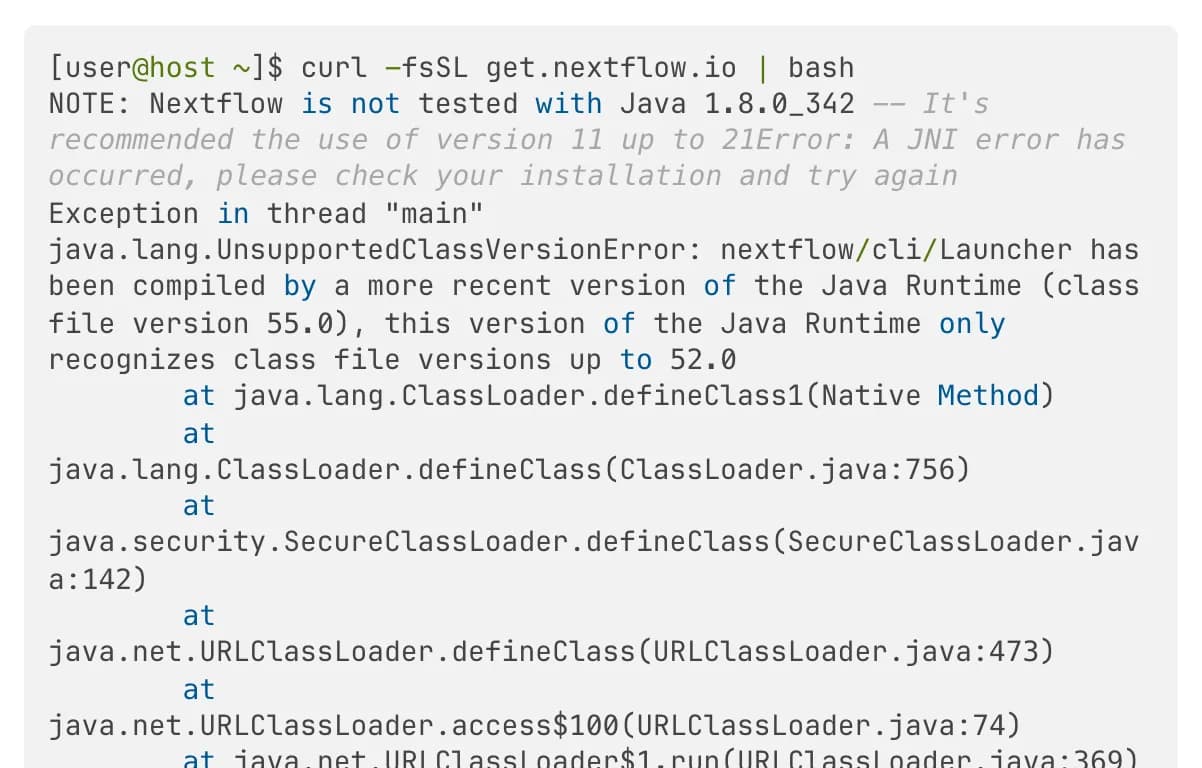
Nextflow is not tested with Java 1.8.0_342
Cause: The system has Java 1.8, which Nextflow does not support.
Fix: Install a separate Java 17–26 and point JAVA_HOME to it; you do not need to remove Java 1.8.
NOTE: Nextflow is trying to use the Java VM defined by the following environment variables
Cause: JAVA_HOME or NXF_JAVA_HOME points to the wrong Java.
Fix: Use the JAVA_CMD path shown in the message to correct that variable.
Outdated Nextflow version when installed via Conda
Cause: The conda Nextflow package is older and easily conflicts with other packages.
Fix: Uninstall the conda version and use the official installer: curl -s https://get.nextflow.io | bash.
What may come next: The installer version uses the system Java, so the Java errors above appear if that Java is too old.
nextflow: command not found
Cause: The Nextflow install folder is not on PATH.
Fix: Add the install folder to PATH, then run source ~/.bashrc.
Error: permission denied when running Nextflow
Cause: The nextflow file is not executable.
Fix: Run chmod +x nextflow.
nextflow self-update fails
Cause: Nextflow is installed in a folder you cannot write to.
Fix: Reinstall Nextflow in a folder you can write to.
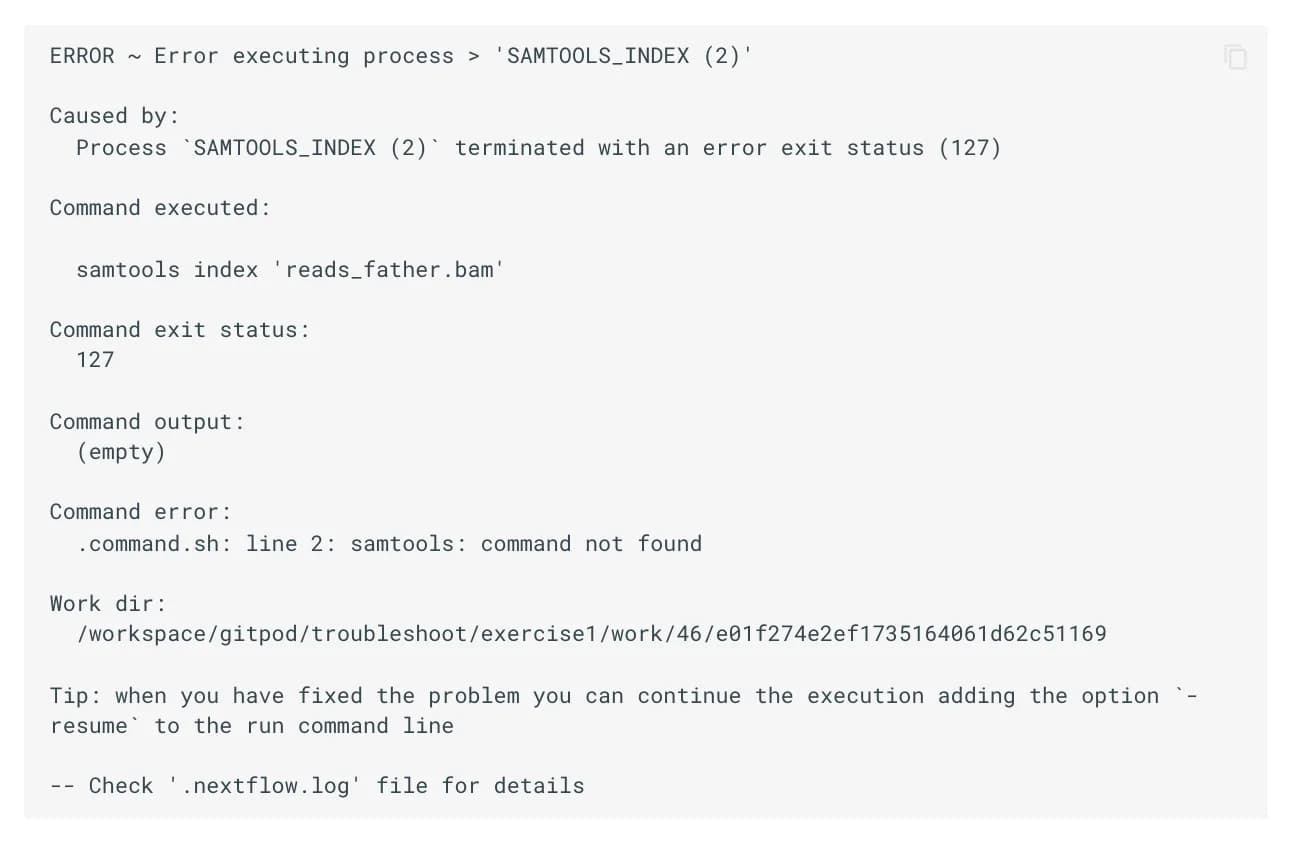
Process `SAMTOOLS_INDEX (2)` terminated with an error exit status (127)
Cause: A program the pipeline calls, such as samtools, is not on PATH.
Fix: Install the programs the pipeline uses and add them to PATH, or enable the pipeline's conda profile so it installs them.
What may come next: The more tools a pipeline uses, the more their dependencies clash, so fixing one often leads straight to the next.
Command exit status: 137
Cause: The step ran out of memory and was killed.
Fix: Give that process more memory with withName in a config file and pass it with -c.
Nextflow DSL1 is no longer supported
Cause: The script uses the old DSL1 syntax, which newer Nextflow no longer supports.
Fix: Rewrite the script in DSL2; to run an old script once, use Nextflow 22.10.x or earlier.
What may come next: With an old Nextflow, newer plugins and nf-core pipelines may stop working.

Nextflow ERROR ~ Cannot read write-only property: from
Cause: The code uses the DSL1 from syntax.
Fix: Rewrite it in DSL2 following the Migrating from DSL1 section of the official docs.
ERROR ~ Plugin nf-schema with version @2.6.1 does not exist in the repository
Cause: The plugin registry does not have the requested plugin version.
Fix: Switch to a plugin version that exists in the registry.
What may come next: Plugin and Nextflow versions must also match, so changing the plugin may require a Nextflow upgrade.
Invalid method invocation `call` with arguments
Cause: The number of items the channel emits does not match the closure parameters.
Fix: Make each emission match the closure parameters one to one.
Scientify is a cloud computer with research software installed and AI agents such as Codex and Claude Code built in. Describe what you need in one sentence, for example "run this Nextflow pipeline on these sequencing files and summarize the QC report", and the agent uses the preinstalled Nextflow to do the modeling and computation, with no software to install and no code to write.
Compared with installing more on your own computer, the cloud computer already has Nextflow 26.10.3 with its own OpenJDK 25.0.2, plus samtools, bwa, FastQC and other common tools, and runs continue after you close your laptop.
The cloud computer comes with more computing power: CPU and GPU clusters can be called on demand for large-scale scientific computing. Compute is billed by the minutes you actually use, so nothing is wasted.
- Cloud computer
- 4 vCPU · 8 GB
- Top configuration, for data processing and small to medium jobs
- Callable GPU
- 96 GB VRAM
- Up to an RTX PRO 6000 per GPU; H800 80 GB and up to 8 × A10G also available
- Callable CPU
- 224 cores · 3 TB
- Largest spec, for large parallel computations
References
- Nextflow official install documentation — Java 17 to 26, Windows through WSL, conda risks, self-installing package, NXF_JAVA_BUNDLE
- nf-core troubleshooting: Nextflow environment — incompatible Java version, permission denied, self-update failure, nextflow: command not found, outdated conda version
- Nextflow launcher script — Java 17 message, Cannot find Java message, use of JAVA_HOME and NXF_JAVA_HOME
- Seqera community: UnsupportedClassVersionError and Java 1.8 — class file version 55.0 and the Java 1.8.0_342 message
- GitHub issue #3915: DSL1 error — Exact text of Nextflow DSL1 is no longer supported, and the note that the -dsl1 option no longer works
- Seqera community: Cannot read write-only property: from — DSL1 syntax explanation and DSL2 migration advice
- Seqera community: plugin nf-schema version not found — Exact plugin error text and a user report on NXF_SYNTAX_PARSER=v1
- Nextflow Gotchas: Invalid method invocation call — Cause and fix for a mismatch between channel elements and closure parameters
- Nextflow training: troubleshooting exercise — Exact exit status (127) and command not found text, docker.enabled example
- nf-core troubleshooting: crashes and exit code 137 — Command exit status 137, memory retries, withName example
- nf-core troubleshooting: basics — Tools a pipeline needs should be on PATH
- GitHub issue #1964: plugins and offline runs — Plugins are downloaded to $HOME/.nextflow/plugins, and cannot be downloaded offline