 Scientify
About this page
How-to guide- What this page solves
- You want a keyword co-occurrence or co-citation map in VOSviewer but are unsure where to download it, whether CNKI data works, and how to set thresholds and clustering parameters.
- Who it is for
- Graduate students doing bibliometrics for the first time, and authors who need to report VOSviewer parameters.
- What you will have
- You will be able to build a keyword co-occurrence map, report your parameters, and explain why the number of clusters changes with the settings.
- Covers
- Official site, version, Java requirement and the online version
- Importing WoS, Scopus, OpenAlex and CNKI data
- Minimum occurrences, thesaurus files and association strength normalization
- How resolution changes the number of clusters, with test results
- Map and network file formats, with downloadable files
- Does not cover
- Keyword burst detection (not in VOSviewer; see the CiteSpace guide)
- A screenshot walkthrough of every VOSviewer menu
- Writing a full search strategy
Main steps
Step 1
Why this stepCheck the version and Java environment so the program starts and has enough memory.
The official VOSviewer site is vosviewer.com. The download page offers a Windows executable package, a macOS application package and a JAR file for other systems. The site states that the software can be used freely for any purpose, and downloading needs no registration.
VOSviewer is a Java program and needs Java 8 or later; Oracle Java and OpenJDK distributions such as Eclipse Temurin both work. Large networks can run out of memory; start it from the command line with a higher memory limit.
The official version has an English interface. Modified installers labelled as other language versions come from third parties and cannot be verified.
java -Xmx4000m -jar VOSviewer.jarjava -jar VOSviewer.jar -map keywords_map.txt -network keywords_network.txt| Item | Details |
|---|---|
| Latest version | 1.6.21 (2026-06-12) |
| Price | Free for any purpose |
| Requirement | Java 8 or later |
| Packages | Windows, macOS, JAR (other systems) |
| Online version | app.vosviewer.com, opens map/network files and JSON files |
Step 2
Why this stepEach data source has its own reader and supports different analyses.
In VOSviewer, click Create, choose Create a map based on bibliographic data, then pick the reader for your source. From Web of Science, export plain text or tab-delimited files with Full Record and Cited References. From Scopus, export CSV with all fields and references.
According to the release notes on the official site, VOSviewer 1.6.18 added maps based on OpenAlex data, 1.6.17 added Lens exports, and 1.6.20 added the new Scopus export format.
CNKI has no dedicated reader. A common approach is to export from CNKI in RefWorks or EndNote format, read it in VOSviewer as reference manager files, and build keyword co-occurrence from the keyword field. VOSviewer's text mining of titles and abstracts supports English only, so it cannot be used on Chinese titles and abstracts. CNKI records have no usable cited references, so co-citation is not possible.
| Source | Export format | Possible analyses |
|---|---|---|
| Web of Science | Plain text or tab-delimited, Full Record and Cited References | All |
| Scopus | CSV with all fields and references | All |
| OpenAlex | Supported since VOSviewer 1.6.18 | Co-occurrence, citation and collaboration |
| CNKI | RefWorks or EndNote | Keyword co-occurrence and co-authorship; no co-citation or Chinese text mining |
Step 3
Why this stepThis step decides which keywords stay on the map and whether different spellings of one concept are merged.
Choose Co-occurrence as the type of analysis and All keywords (author keywords plus database keywords) or Author keywords as the unit. With Full counting, each keyword pair in a paper counts once; Fractional counting divides the weight by the number of keywords in the paper.
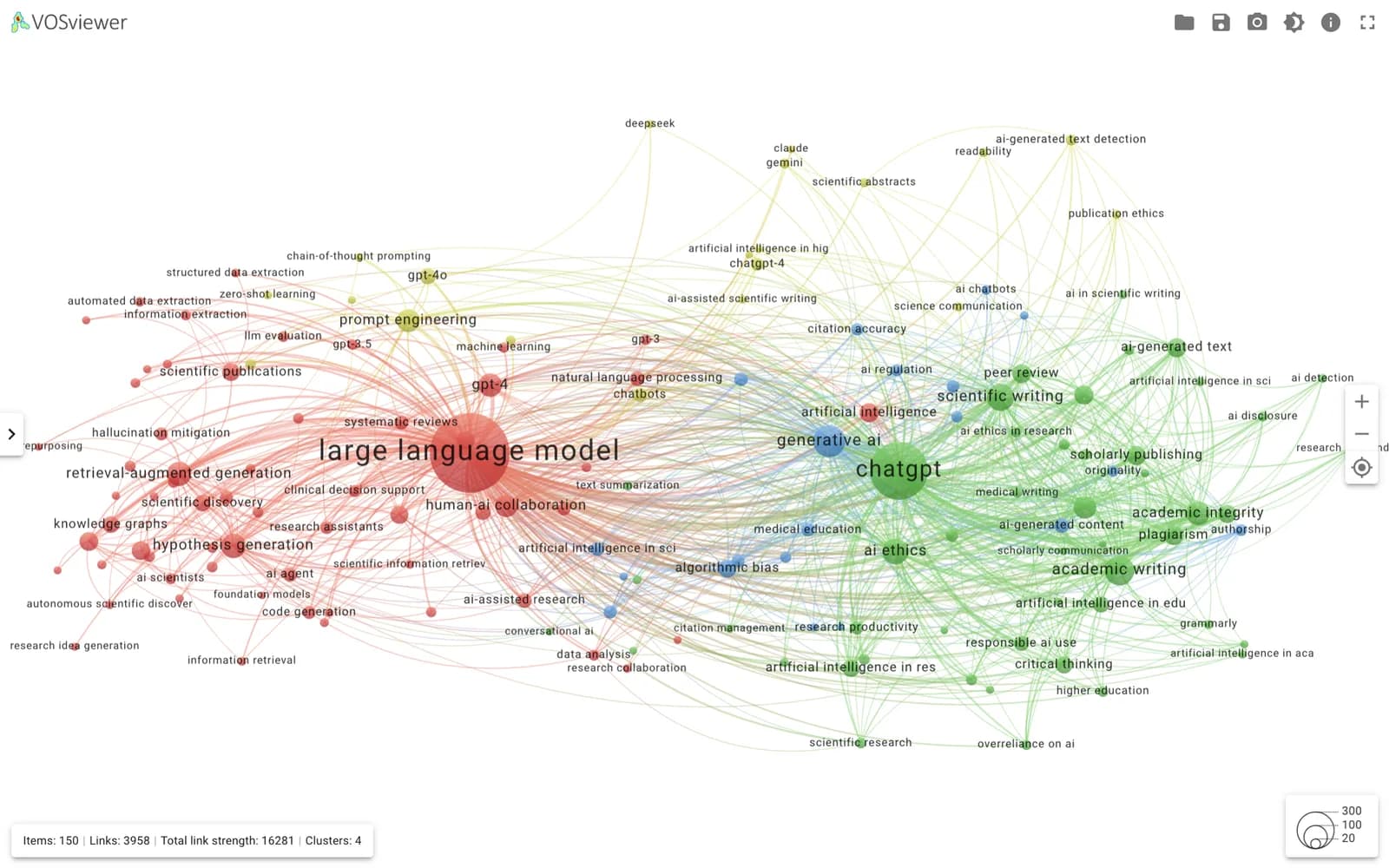
Minimum number of occurrences decides which keywords stay. A higher threshold removes small topics; a lower one makes the map crowded. In the task behind this page, 491 of 6,676 distinct keywords occurred at least 5 times, and the 150 most frequent (at least 13 occurrences) were kept. Report the threshold and the keyword counts before and after filtering.
A thesaurus file merges plural forms, abbreviations and spelling variants, such as LLM, large language model and large language models. It is a tab-delimited text file with two columns and the header label and replace by. Do not merge terms with different meanings; GPT-4 and large language model are different concepts.
label	replace by
llm	large language model
llms	large language model
large language models	large language model
chat-gpt chatgptStep 4
Why this stepResolution mainly determines the number of clusters. Report it whenever you report clusters.
VOSviewer clustering has three settings: resolution, minimum cluster size and whether to merge small clusters. A higher resolution gives more and smaller clusters. The online version defaults to resolution 1, minimum cluster size 1, with small clusters merged.
We opened the 150-keyword network from the task in VOSviewer Online, kept the other defaults, changed only the resolution and reran VOSviewer's own clustering. From resolution 0.5 to 2, the number of clusters rose from 2 to 22. The same data can yield 2 to 22 research themes, so report the resolution with the number of clusters and explain why you chose it.
The task's Python Louvain clustering gave 4 clusters at resolution 1, while VOSviewer's algorithm gave 6 at the same resolution. The two use different objective functions and normalization, so their results differ.
| Resolution | 0.5 | 0.75 | 1 (default) | 1.5 | 2 |
|---|---|---|---|---|---|
| VOSviewer clusters | 2 | 3 | 6 | 11 | 22 |
- Report resolution, minimum cluster size and whether small clusters were merged
- Check whether clusters stay stable across two or three neighboring resolutions
- Name clusters from their frequent terms and representative papers, not from colors
Step 5
Why this stepMap and network files move results between computers and the online version, and let you bring Python or R results into VOSviewer.
VOSviewer Online runs at app.vosviewer.com without installation. Click Open at the top right, choose VOSviewer map and network file, select the map file and the network file, and click OK. The online version can also recompute layout and clustering.
A map file is tab-delimited text with a header row. Common columns are id, label, weight<Occurrences> and cluster, with optional x and y coordinates. Without coordinates VOSviewer computes a layout. A network file has no header; each line has three columns: source id, target id and link strength.
The four files below come from the task and were opened in VOSviewer Online. The keyword co-occurrence network has 150 nodes, 3,958 links and 4 clusters; the reference co-citation network has 200 nodes, 7,765 links and 2 clusters. Download them to practice with the parameters on this page.
id	label	weight<Occurrences>	cluster
1	large language model	1421.0	1
2	chatgpt	750.0	2
3 generative ai 230.0 31 2 396.0
1 3 103.0
1 4 101.0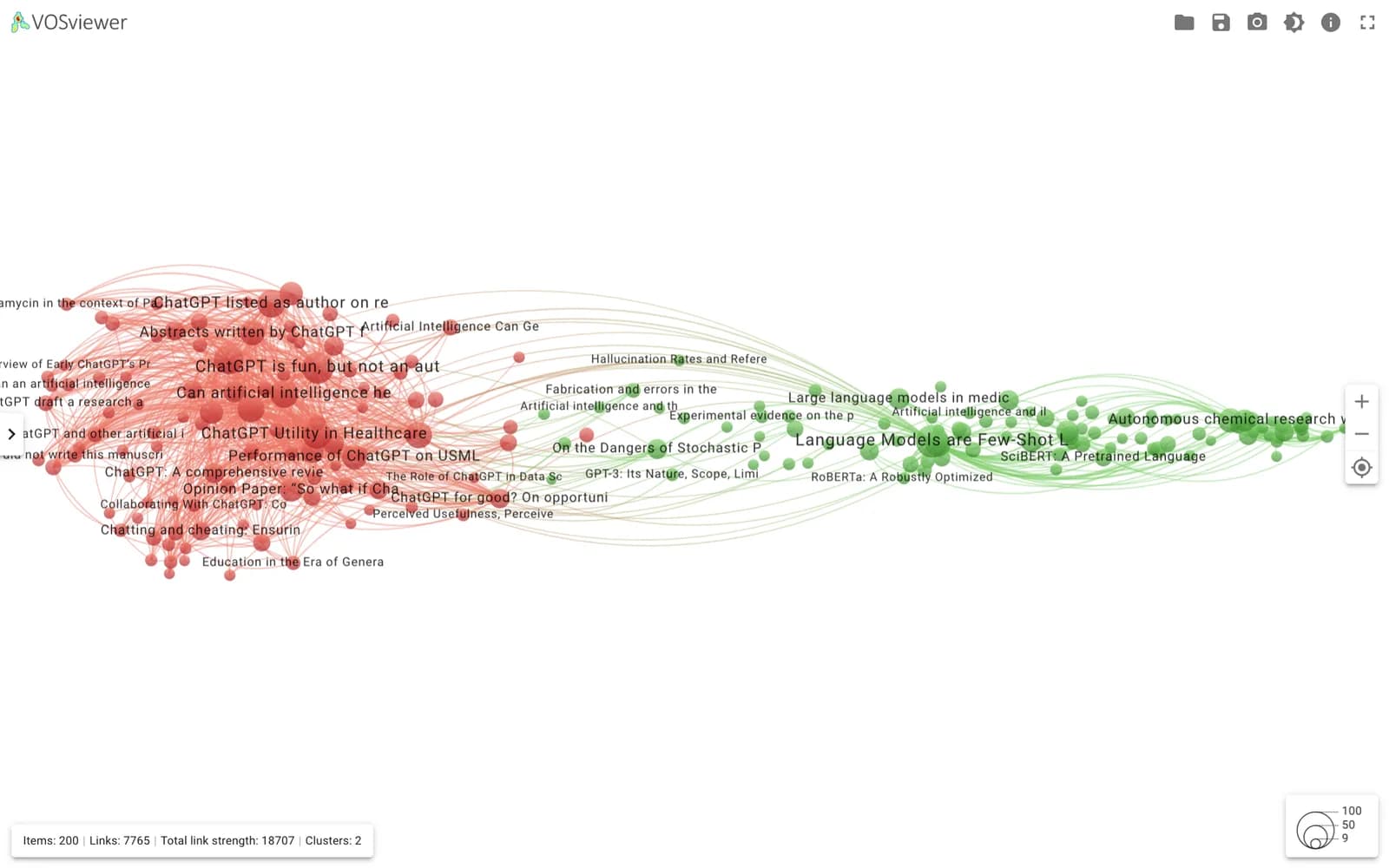
- keywords_map.txtKeyword co-occurrence map file, 150 OpenAlex keywords.
- keywords_network.txtKeyword co-occurrence network file; link strength is the raw co-occurrence count.
- cocitation_map.txtReference co-citation map file, 200 cited references labelled by title.
- cocitation_network.txtReference co-citation network file.
Reference and appendix
Run record
Why this stepData source, methods and what was verified.
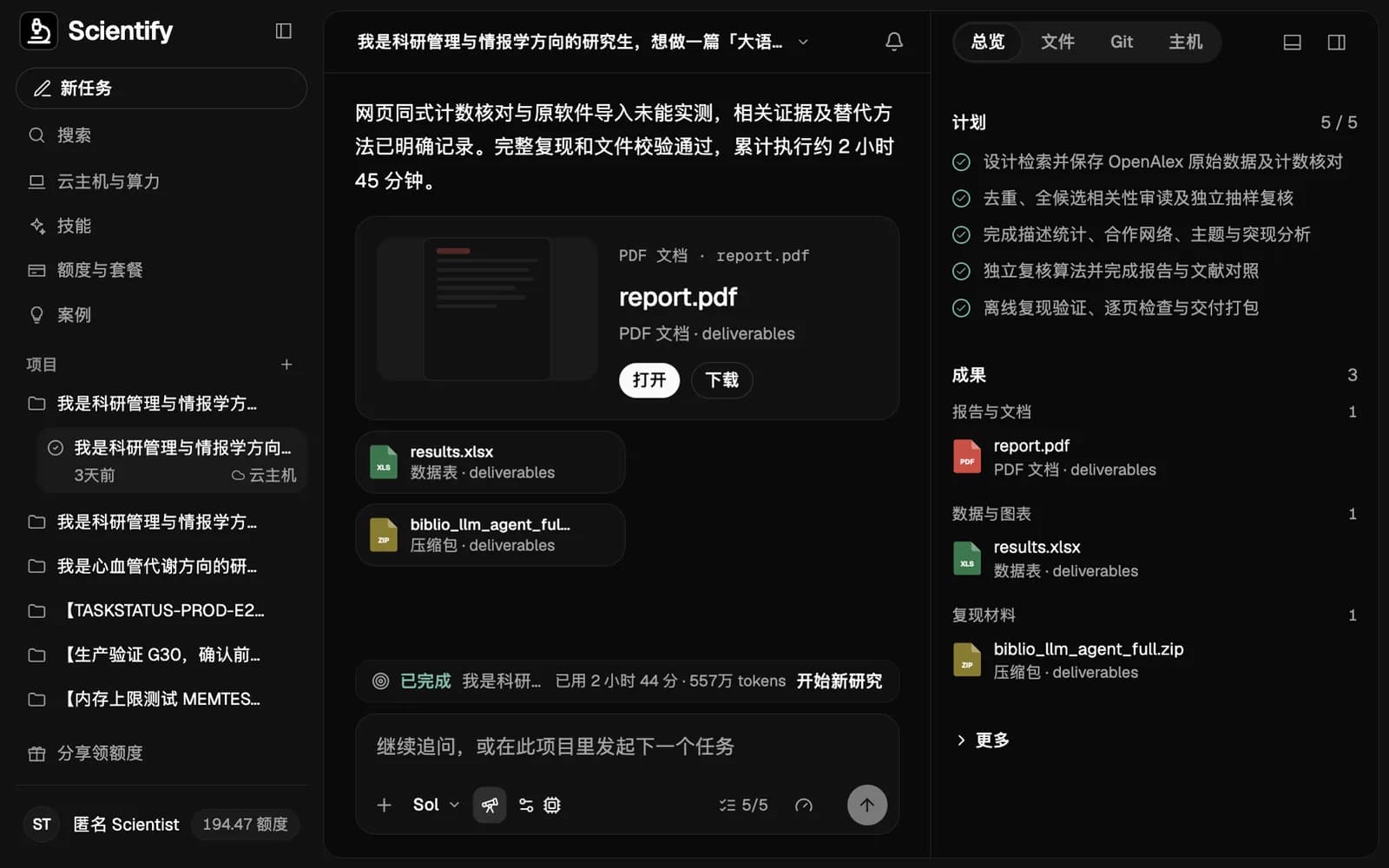
The network files come from a long-running research task on Scientify between 30 October and 2 November 2026 on LLMs and AI agents in scientific research, 2020–2025. Data came from the OpenAlex API. Scientify screened all 3,297 candidates by title and abstract and kept 2,120 papers; an independent check of 50 found 49 relevant.
During the task the VOSviewer site timed out and the cloud computer could not get an installer. Scientify computed co-occurrence, association strength normalization and Louvain clustering in Python and exported map and network files in VOSviewer format. On 3 November 2026 we opened these files in VOSviewer Online and ran the resolution test above. Burst results are in the CiteSpace guide.
Troubleshooting
Double-clicking the JAR does nothing, or Java is not found
Cause: Java 8 or later is not installed.
Fix: Install an OpenJDK distribution such as Eclipse Temurin, confirm with java -version, then start VOSviewer.
VOSviewer freezes or reports insufficient memory on large data
Cause: The default Java memory limit is too low.
Fix: Start with java -Xmx4000m -jar VOSviewer.jar to raise the limit to 4 GB.
Text mining on CNKI data extracts no Chinese terms
Cause: VOSviewer text mining supports English only.
Fix: Use the keyword field for co-occurrence, or segment the text in Python or R and import the result as map and network files.
Too many clusters, many with only a few terms
Cause: Resolution is too high or the minimum cluster size too small.
Fix: Lower the resolution, or raise the minimum cluster size and merge small clusters. In our test, going from resolution 1 to 0.75 reduced the clusters from 6 to 3.
One concept appears as several nodes, such as llm and large language models
Cause: No thesaurus file was loaded.
Fix: Create a two-column thesaurus file, load it before selecting keywords, and rebuild the map.
Sources
- VOSviewer download page — Version, license and Java requirement, accessed 2026-11-03
- VOSviewer release notes (home page) — OpenAlex, Lens and new Scopus format support
- VOSviewer Online documentation — Supported file types and the Open button
- van Eck & Waltman, Software survey: VOSviewer, Scientometrics 2010