 Scientify
About this page
How-to guide- What this page solves
- You are planning a bibliometric or science-mapping study and need to know where to get CiteSpace now, whether you must pay, and how to set parameters and read the results.
- Who it is for
- Graduate students doing bibliometrics for the first time, and authors who need to report CiteSpace parameters in a methods section.
- What you will have
- You will be able to decide between paid CiteSpace and free tools, report your parameter settings, and interpret Q, S and burst results correctly.
- Covers
- Official site, versions, prices and the status of the free edition (verified November 2026)
- Exporting and importing Web of Science and CNKI data
- Time slicing, node types, the g-index k, pruning and LLR labels
- What modularity Q and mean silhouette S mean, and common misreadings
- Keyword burst parameters and interpretation, with real results
- Free alternatives
- Does not cover
- A screenshot walkthrough of every CiteSpace menu
- Paid CiteSpace 7 features such as GPT cluster summaries
- Writing a full search strategy
Main steps
Step 1
Why this stepConfirm which version you can get and whether you need to pay before choosing your software.
The official CiteSpace site is citespace.podia.com, maintained by the developer Chaomei Chen. Downloads and purchases both happen there. His Drexel University page keeps earlier introductions and documents. Installers shared on third-party file hosts cannot be verified and are not recommended.
On 3 November 2026 the site listed only the three paid licenses in the table below and no free edition. All three are described as CiteSpace: Advanced version. They differ in term and number of computers, and they are non-transferable.
The former free Basic edition is 6.3.R1. Its download page shows a validity of 2024-03-10 to 2025-12-31 and the message Enrollment is closed. The citespace project on SourceForge was last updated on 2024-02-15 and its files page has no installer. Free-download guides published around 2023 no longer apply.
The site currently offers three versions. 7.0.2 is the latest (2026-08-25), with installers for Windows 11 and Mac (arm64 and x86-64). 7.0.1 is available for Windows, Mac and Linux (Ubuntu 22.04); use it on a Linux server. 6.4.R2 Advanced runs on Windows only and adds GPT-assisted cluster summaries.
| License | Price | Term | Computers |
|---|---|---|---|
| Standard | USD 65 | 1 year | 1 |
| Intermediate | USD 110 | 1 year | 2 |
| Advanced | USD 155 | 2 years | 2 |
Step 2
Why this stepCiteSpace reads Web of Science plain text natively; other sources need conversion.
Web of Science is the most common data source for CiteSpace. On the WoS results page, export as a plain text file and choose Full Record and Cited References. Without cited references, co-citation analysis has no data.
Each CiteSpace project needs a project folder and a data folder. Put the WoS files in the data folder with names starting with download, such as download_1.txt. If zero records are imported, check the file name, UTF-8 encoding, that each record starts with PT and ends with ER, and that the file ends with EF.
For CNKI, export in Refworks format and convert it with Data → Import/Export → CNKI in CiteSpace. CNKI records have no usable cited-reference field, so only keyword, author and institution analyses are possible.
OpenAlex and Scopus use field structures that differ from WoS. The task behind this page pulled data from the OpenAlex API and exported an exchange file arranged in WoS fields. That file passed field and count checks only and was not imported into CiteSpace. Check the imported record count and year distribution before using it.
| Source | Export format | Possible analyses | Notes |
|---|---|---|---|
| Web of Science | Plain text, Full Record and Cited References | All, including co-citation | Requires a subscription; file names start with download |
| CNKI | Refworks, then convert in CiteSpace | Keywords, authors, institutions | No usable cited-reference field |
| Scopus | CSV with references | After conversion | Reference format differs from WoS; check counts after conversion |
| OpenAlex | Raw API JSON | After your own conversion | Open and free; keywords are machine-assigned and some abstracts and affiliations are missing |
Step 3
Why this stepThese parameters decide which nodes and links stay in the network. Report each of them in your methods section.
Choose parameters for a specific question. Keyword co-occurrence answers research themes, reference co-citation answers the knowledge base, and country or institution networks answer collaboration structure. Use one node type per run so the result is easy to interpret.
The g-index k is often misread. k is a scaling factor that controls how many top nodes each time slice keeps; a larger k keeps more nodes and weak links. It does not mean that each paper is cited at least k times. Compare node counts, the largest connected component and the theme interpretation under several k values before choosing one.
Pruning (Pathfinder, pruning sliced networks, pruning the merged network) removes some links and changes the visible structure. Save the unpruned network first and compare the maps with and without pruning. A Q computed on a pruned network should not be reported as the Q of the original network.
LLR (log-likelihood ratio) labels clusters; a separate algorithm forms the clusters. LLR picks the terms from titles, keywords or abstracts that best distinguish a cluster, and it sometimes picks rare or off-topic terms. Confirm cluster names by reading each cluster's representative papers.
| Parameter | Common setting | Effect | What to report |
|---|---|---|---|
| Time slicing | 1 year per slice | Coarser slices hide short-term change | Start and end years and slice length |
| Node types | Keyword, Reference, Country, Institution, etc. | Defines the question | Node type of each run |
| Selection criteria | g-index, k often 25 | Larger k keeps more nodes | k value and software version |
| Pruning | Pathfinder or none | Removes links; changes visible structure and Q | Whether and how you pruned |
| Cluster labels | LLR | Changes label text only, not the clusters | Label source (title, keyword or abstract) and manual edits |
Concepts and judgment
Interpreting results
Why this stepQ and S are the most cited and most often misread numbers in CiteSpace output.
Modularity Q measures whether links within clusters exceed what a random network would give; a higher value means a clearer cluster structure. Mean silhouette S measures how similar each node is to its own cluster compared with the nearest other cluster, and ranges from -1 to 1.
Tutorials often cite Q > 0.3 as a significant structure, S > 0.5 as reasonable clustering and S > 0.7 as convincing clustering. These are rules of thumb, not statistical tests. Q depends on network size, weighting, resolution and pruning, and a sparse, disconnected network can produce a very high Q. S depends on the distance definition, so S values from different software are not comparable.
The table shows two networks from the task behind this page. They were built in Python, and S uses one minus the cosine similarity of document incidence vectors, which differs from CiteSpace. This is why S is very low. The point of the table is that S for the same data depends heavily on its definition, so 0.7 is not a universal pass mark.
| Network | Nodes | Links | Modularity Q | Silhouette S |
|---|---|---|---|---|
| Keyword co-occurrence (OpenAlex keywords, ≥13 occurrences) | 150 | 3,958 | 0.258 | 0.015 |
| Reference co-citation (≥10 citations) | 200 | 7,765 | 0.322 | 0.057 |
- Report network size, pruning and software version together with Q and S
- A high Q alone does not show that themes are meaningful; check representative papers
- Single-node clusters can raise or lower S; state whether small clusters were excluded
- Before comparing S across papers, confirm they used the same software and distance
Interpreting results
Why this stepBurst detection finds keywords or references whose frequency rises sharply during a period.
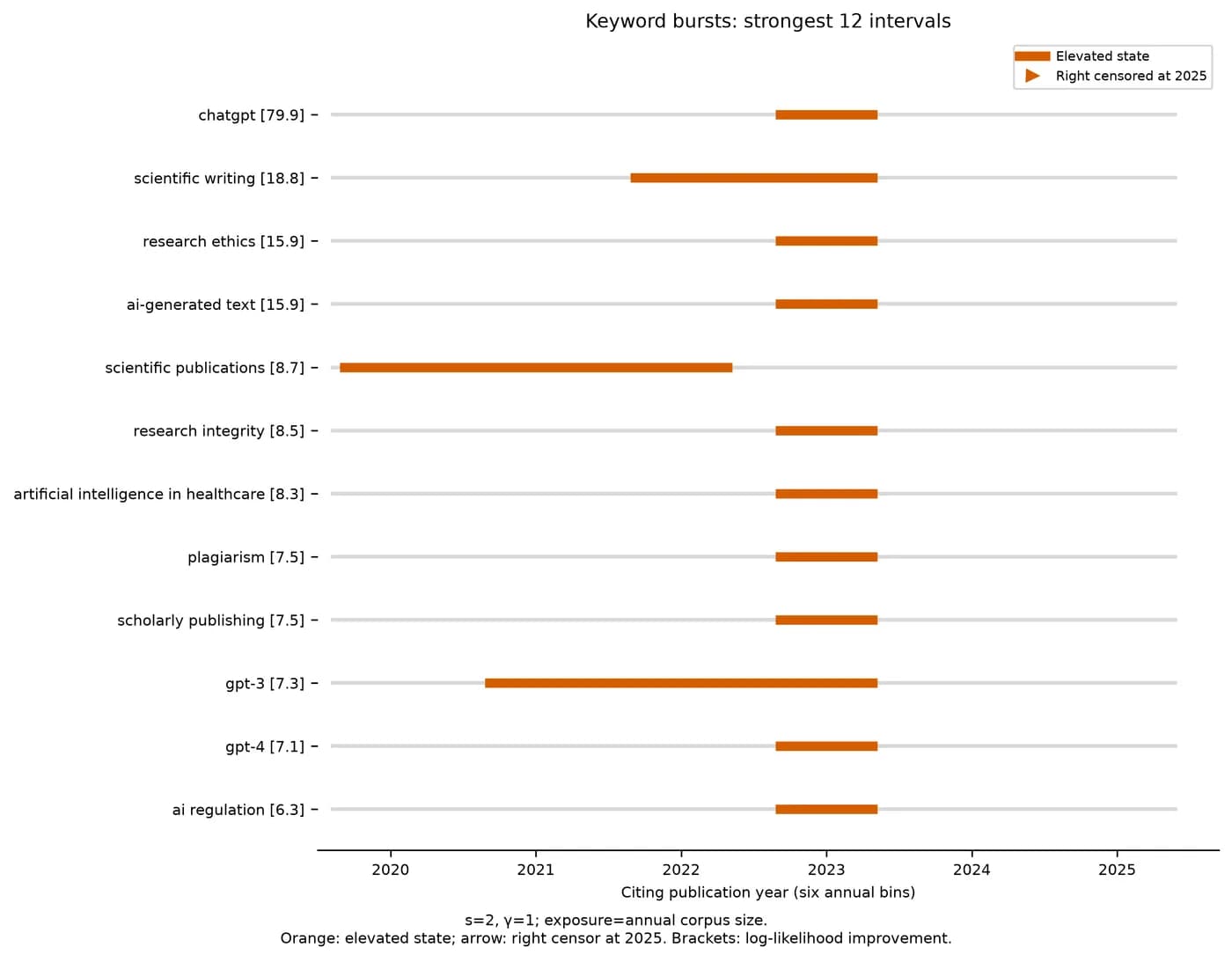
CiteSpace burst detection is based on Kleinberg's algorithm. It treats yearly counts as generated by a normal state or a high-frequency state and uses dynamic programming to find the years most likely in the high state. γ sets the penalty for entering the high state; a smaller γ detects bursts more easily. Minimum duration controls how short a burst can be.
Burst strength is a model fit score, not a citation count. When the total number of papers grows quickly, use the yearly paper count as the denominator; otherwise every term appears to burst. A burst still active in the last year of data should not be read as finished.
The task behind this page implemented the same algorithm in Python with s = 2 and γ = 1 for the main analysis, and ran (1.5, 1), (2, 0.5) and (2, 2) as sensitivity checks. Among the top 12 bursts, chatgpt, scientific writing, research ethics and ai-generated text were detected with the same interval in all three settings.
| Keyword | Occurrences | Burst years | Strength | Detected in sensitivity settings |
|---|---|---|---|---|
| chatgpt | 750 | 2023 | 79.9 | 3/3 |
| scientific writing | 166 | 2022–2023 | 18.8 | 3/3 |
| research ethics | 116 | 2023 | 15.9 | 3/3 |
| ai-generated text | 82 | 2023 | 15.9 | 3/3 |
| scientific publications | 71 | 2020–2022 | 8.7 | 2/3 |
Choose by your situation
Choices
Why this stepFree tools cover co-occurrence, clustering and visualization; burst detection needs another tool.
VOSviewer is developed by CWTS at Leiden University and is free for any purpose; the latest version is 1.6.21. It is strong at visualizing keyword co-occurrence, co-citation and collaboration networks. It reads WoS, Scopus and Lens exports, and since 1.6.18 it can also build maps from OpenAlex data. VOSviewer has no burst detection.
bibliometrix is a free, open-source R package with a web interface called biblioshiny. It reads WoS, Scopus and OpenAlex data and covers descriptive statistics, co-occurrence, co-citation and thematic evolution.
The task behind this page could not obtain a CiteSpace installer. It completed the whole analysis in Python and exported map and network files that VOSviewer opens directly. We opened these files in VOSviewer Online; see the VOSviewer guide.
library(bibliometrix)
M <- convert2df("download_1.txt", dbsource = "wos", format = "plaintext")
res <- biblioAnalysis(M, sep = ";")
summary(res, k = 10)
NetMatrix <- biblioNetwork(M, analysis = "co-occurrences", network = "keywords", sep = ";")
networkPlot(NetMatrix, n = 50, type = "fruchterman", Title = "Keyword co-occurrence")| Need | CiteSpace | VOSviewer | bibliometrix |
|---|---|---|---|
| Price | From USD 65/year | Free | Free, open source |
| Keyword co-occurrence and clustering | Yes | Yes | Yes |
| Reference co-citation | Yes | Yes | Yes |
| Keyword bursts | Yes | No | No (has Trend Topics) |
| Time view | Timeline view | Overlay view | Thematic evolution |
| Reads OpenAlex | Needs conversion | Yes (since 1.6.18) | Yes |
Reference and appendix
Run record
Why this stepData source, methods and what was not done.
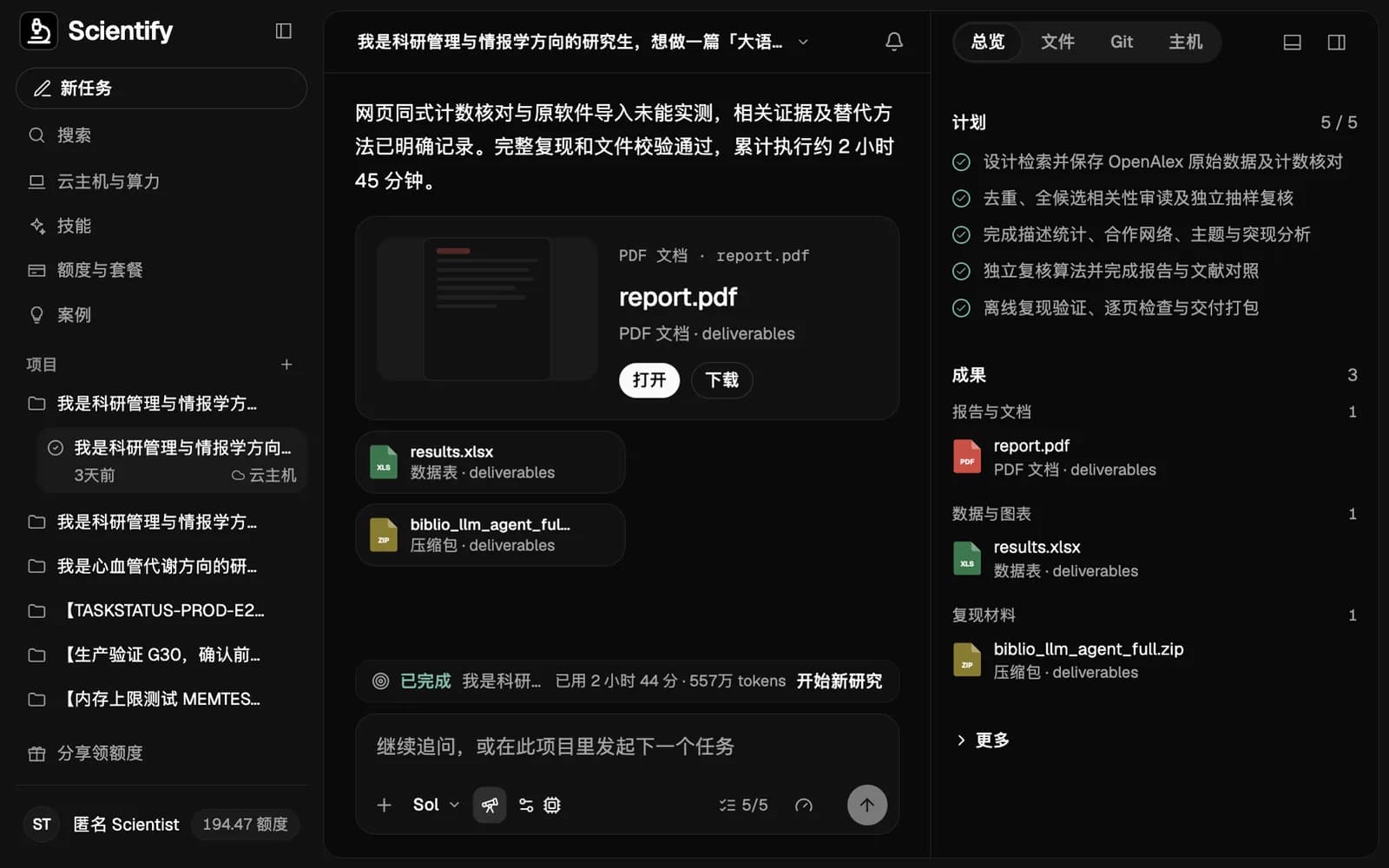
The numbers come from a long-running research task on Scientify between 30 October and 2 November 2026 on LLMs and AI agents in scientific research, 2020–2025. Data came from the OpenAlex API: 7,543 records from the main query and 1,714 from a supplementary query. Two rounds of rule-based screening had spot-check relevance of only 74% and 80%, so Scientify withdrew those results and screened all 3,297 candidates by title and abstract. The final corpus has 2,120 papers; an independent check of 50 found 49 relevant.
The cloud computer could not obtain CiteSpace or VOSviewer: the free CiteSpace enrollment was closed and the VOSviewer site timed out at the time. The analysis used Python implementations of association strength, Louvain clustering and Kleinberg bursts, and the report states that these are not native software output. The task ran on the cloud computer's CPU and delivered a 27-page report, a 32-sheet Excel workbook, 20 figures and offline reproduction scripts, and passed independent review.
Troubleshooting
The free CiteSpace download in old tutorials cannot be found
Cause: The free Basic edition 6.3.R1 is dated to 2025-12-31 and enrollment is closed; SourceForge has no installer.
Fix: Buy a license at citespace.podia.com, or use free VOSviewer or bibliometrix.
CiteSpace imports 0 records
Cause: The file name does not start with download, the encoding is not UTF-8, or the export did not include the full record.
Fix: Rename the file to download_1.txt, save as UTF-8, and confirm records start with PT, end with ER, and the file ends with EF.
The co-citation network is empty
Cause: The export did not include cited references, or the data came from CNKI.
Fix: Re-export from WoS with Full Record and Cited References. Use CNKI data only for keyword, author and institution analyses.
The map is too dense and labels overlap
Cause: k is too large, or each slice keeps too many nodes.
Fix: Lower k or use Top N, then prune for readability and report the pruning method.
Q is high but the clusters do not make sense
Cause: Sparse or disconnected networks can have a high Q; LLR labels may pick rare terms.
Fix: Read each cluster's representative papers, name clusters manually, and check the share of the largest connected component.
Sources
- CiteSpace official site (Podia) — Versions and prices, accessed 2026-11-03
- CiteSpace download page — Validity and enrollment status of the free Basic 6.3.R1
- CiteSpace glossary
- citespace on SourceForge
- Kleinberg, Bursty and Hierarchical Structure in Streams, 2002
- bibliometrix convert2df source