 Scientify
About this page
Tutorial- What this page solves
- You want to fine-tune a 7B model on one consumer or cloud GPU but are unsure how to write the QLoRA config, how much VRAM you need, and how to tell whether fine-tuning actually helped.
- Who it is for
- Graduate students and engineers fine-tuning an LLM for the first time. You should know the Linux command line and Python and the difference between train, validation and test sets.
- What you will have
- A ready-to-use QLoRA config, an evaluation method for judging fine-tuning, and complete measured results for a 7B model on PubMedQA.
- Covers
- LLaMA-Factory data format and dataset_info.json registration
- Every QLoRA setting explained (rank, alpha, learning rate, gradient accumulation and more)
- Measured VRAM peaks and GPU choice
- How to confirm 4-bit quantization is really active
- Zero-shot baseline, paired bootstrap intervals and multiple seeds
- Per-class metrics and how to read a class that degrades after fine-tuning
- Does not cover
- Full fine-tuning and multi-GPU training
- Preference alignment such as DPO or RLHF
- Merging, exporting and deploying the model
Main path: step by step
Setup
Why this stepInstall LLaMA-Factory and confirm the command works.
The WebUI is good for learning the settings. For experiments you need to reproduce and record, a YAML config with the command line is easier to manage; this page uses the command line throughout.
If PyTorch is already installed on the server, create a new virtual environment that reuses it and install the other dependencies within the ranges LLaMA-Factory declares, without replacing the CUDA stack.
git clone --depth 1 https://github.com/hiyouga/LlamaFactory.git
cd LlamaFactory
pip install -e .
pip install -r requirements/metrics.txt
# QLoRA also needs bitsandbytes
pip install bitsandbytesllamafactory-cli webui
llamafactory-cli train train.yamlStep 1
Why this stepTraining data must be in a format LLaMA-Factory reads and registered in dataset_info.json.
The expert-labeled PubMedQA set (PQA-L) has 1,000 questions. Each gives a biomedical research question and an abstract with its conclusion removed, and the answer is yes, no or maybe. This example uses the official script to split 450 train, 50 dev and 500 test, with no overlap between sets.
Train and dev data become JSON with instruction / input / output fields: instruction holds the question and abstract, output holds only the answer. The test set is not registered in dataset_info.json, so the training pipeline cannot read it.
{
  "instruction": "Question: ...\nCONTEXTS: ...\nAnswer with yes, no, or maybe.",
  "input": "",
  "output": "yes"
}{
"pubmedqa_train": { "file_name": "train.json" },
"pubmedqa_dev": { "file_name": "dev.json" }
}| Split | Questions | yes | no | maybe |
|---|---|---|---|---|
| Test | 500 | 276 | 169 | 55 |
Step 2
Why this stepPick the GPU by peak VRAM: too small causes OOM, too large wastes money.
The estimate was 14 GB VRAM, 24 GB RAM, 4 CPU cores and 60 GB disk. With a 1.25 margin this selected an AWS g5.2xlarge (A10G 24 GB, 8 cores, 32 GB RAM). 14 GB × 1.25 = 17.5 GB exceeds a T4's 16 GB, and a T4 does not support bf16, so it would need fp16 instead.
The model weights are about 15 GB and downloaded in 140 seconds. The base model and Python environment stay on the GPU server; only adapters, predictions and logs are synced back.
| Run | Measured VRAM peak | Note |
|---|---|---|
| QLoRA (4-bit NF4) training | 7.25 GiB allocated / 8.55 GiB reserved (PyTorch) | nvidia-smi sampled maximum 9,213 MiB |
| Zero-shot inference (4-bit) | 6.59 GiB | batch 4 |
| Accidental BF16 LoRA training | about 22 GiB (22,587 MiB) | Actual use when quantization was not active |
Step 3
Why this stepWithout a baseline under the same protocol, you cannot say how much fine-tuning helped.
The baseline and the fine-tuned model use exactly the same protocol: the same Qwen chat template, the same prompt, 4-bit NF4 loading, greedy decoding and at most 8 new tokens. Output must match yes, no or maybe exactly (ignoring case and a trailing period); anything else is invalid and counts as wrong. Answers are never extracted from explanations.
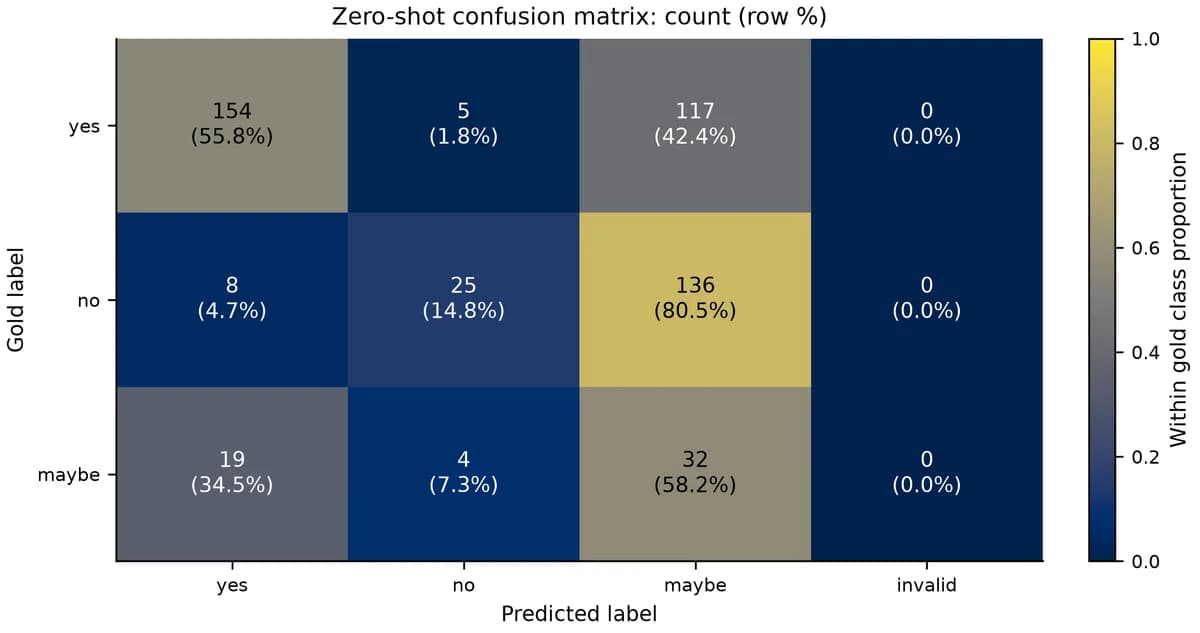
Baseline inference on 500 test questions took about 3 minutes and scored 42.2%, below the 55.2% of always answering yes. The base model answers maybe too often: 117 of 276 yes questions and 136 of 169 no questions were answered maybe.
Step 4
Why this stepRecording each value and the reason for it is what makes reproduction and tuning possible.
LLaMA-Factory implements LoRA through the PEFT library: the base model is frozen and only low-rank matrices A and B on selected linear layers are trained. QLoRA additionally loads the frozen base weights in 4-bit with bitsandbytes. The main fields of the final config are below.
model_name_or_path: /path/to/Qwen2.5-7B-Instruct
stage: sft
do_train: true
finetuning_type: lora
lora_target: all
lora_rank: 16
lora_alpha: 32
lora_dropout: 0.05
quantization_bit: 4
quantization_method: bnb      # must be bnb
quantization_type: nf4
double_quantization: true
dataset: pubmedqa_train
eval_dataset: pubmedqa_dev
template: qwen
cutoff_len: 2048
train_on_prompt: false
per_device_train_batch_size: 1
gradient_accumulation_steps: 16
learning_rate: 1.0e-4
num_train_epochs: 3
lr_scheduler_type: cosine
warmup_ratio: 0.05
bf16: true
gradient_checkpointing: true
optim: paged_adamw_8bit
eval_strategy: epoch
save_strategy: epoch
load_best_model_at_end: true
metric_for_best_model: eval_lossllamafactory-cli train train.yaml| Field | Value | Purpose |
|---|---|---|
| lora_target | all | Add LoRA to every linear layer |
| lora_rank / lora_alpha | 16 / 32 | Low-rank dimension and scaling |
| quantization_bit / method | 4 / bnb | Load and freeze base weights in 4-bit |
| quantization_type / double_quantization | nf4 / true | NF4 quantization with compressed scales |
| batch × accumulation | 1 × 16 | Effective batch 16 with minimal VRAM |
| learning_rate / epochs | 1e-4 / 3 | A limited budget for a small dataset |
| train_on_prompt | false | Compute loss only on the answer |
| load_best_model_at_end | true, by eval_loss | Reload the checkpoint with the lowest dev loss |
- train.yamlFull config for the main seed. Set model_name_or_path to your model folder and put dataset_info.json under dataset_dir.
- train_with_4bit_check.pyChecks at training start that 4-bit is really active and aborts otherwise. Usage: python train_with_4bit_check.py train.yaml.
- prompt.txtThe prompt shared by baseline and fine-tuned evaluation.
Step 5
Why this stepWriting 4-bit in the config does not mean the model is loaded in 4-bit.
The first config used quantization_method: bitsandbytes. The LLaMA-Factory version in use only recognized bnb, and the wrong value produced no error or warning; quantization was simply skipped. The first two training runs were ordinary BF16 LoRA at about 22 GiB.
The problem surfaced in a runtime check before the third seed: is_loaded_in_4bit was False and there were no Linear4bit layers. After changing to bnb, assertions at training start confirmed is_loaded_in_4bit is True, the quant type is NF4, double quantization is on and Linear4bit layers exist, and all three seeds were retrained from scratch. The wrong runs were archived intact and reported separately.
import bitsandbytes as bnb

assert getattr(model, "is_loaded_in_4bit", False), "model is not 4-bit"
qc = model.config.quantization_config
assert qc.bnb_4bit_quant_type == "nf4" and qc.bnb_4bit_use_double_quant
n4 = sum(isinstance(m, bnb.nn.Linear4bit) for m in model.modules())
assert n4 > 0, "no Linear4bit layers"
print("Linear4bit layers:", n4)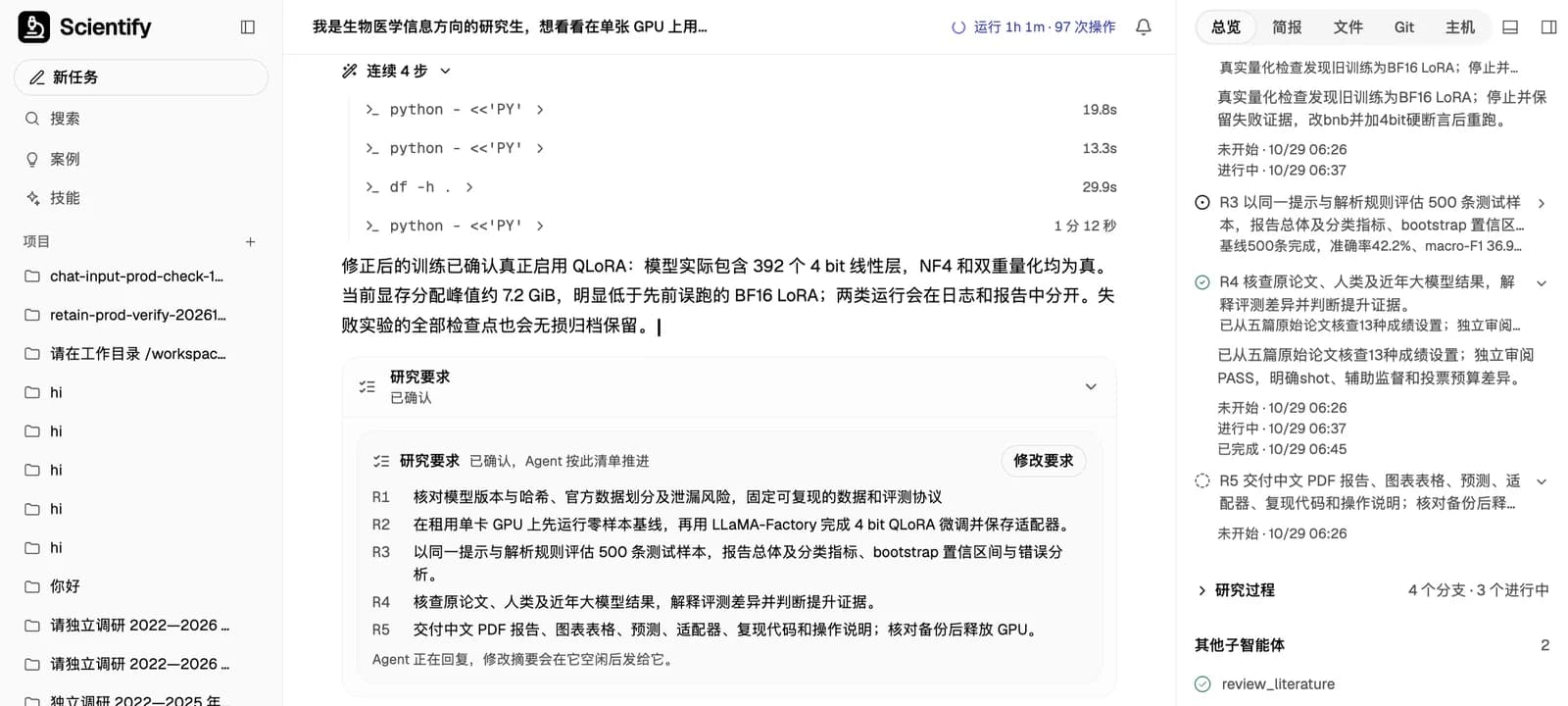
Step 6
Why this stepOn a small dataset training loss drops fast and says little about generalization.
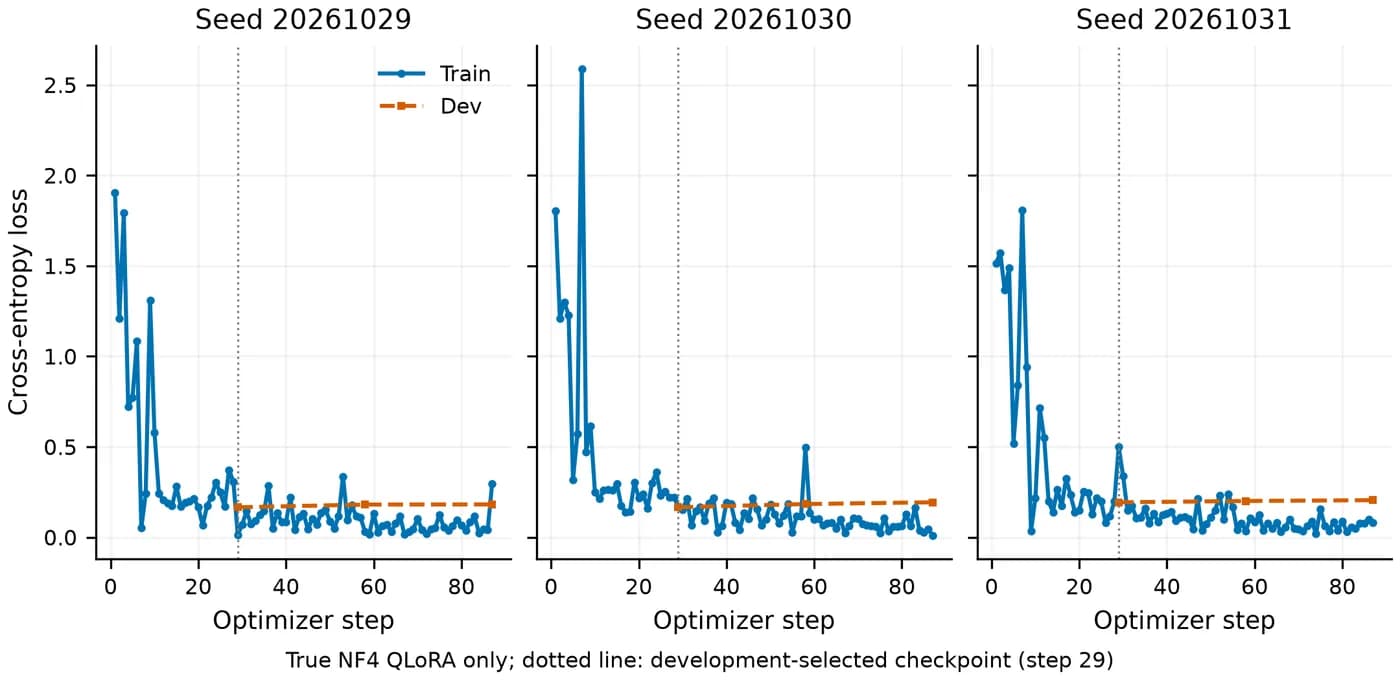
All three seeds have their lowest dev loss after epoch 1. In epochs 2 and 3 training loss keeps falling while dev loss rises, a sign of overfitting on a small sample. load_best_model_at_end reloads the step-29 checkpoint automatically.
The dev set has only 50 questions, 6 of them maybe, so checkpoint selection is itself noisy. Each seed's 87 steps took about 17 minutes.
Step 7
Why this stepCompare before and after on the same test questions and check stability across seeds.
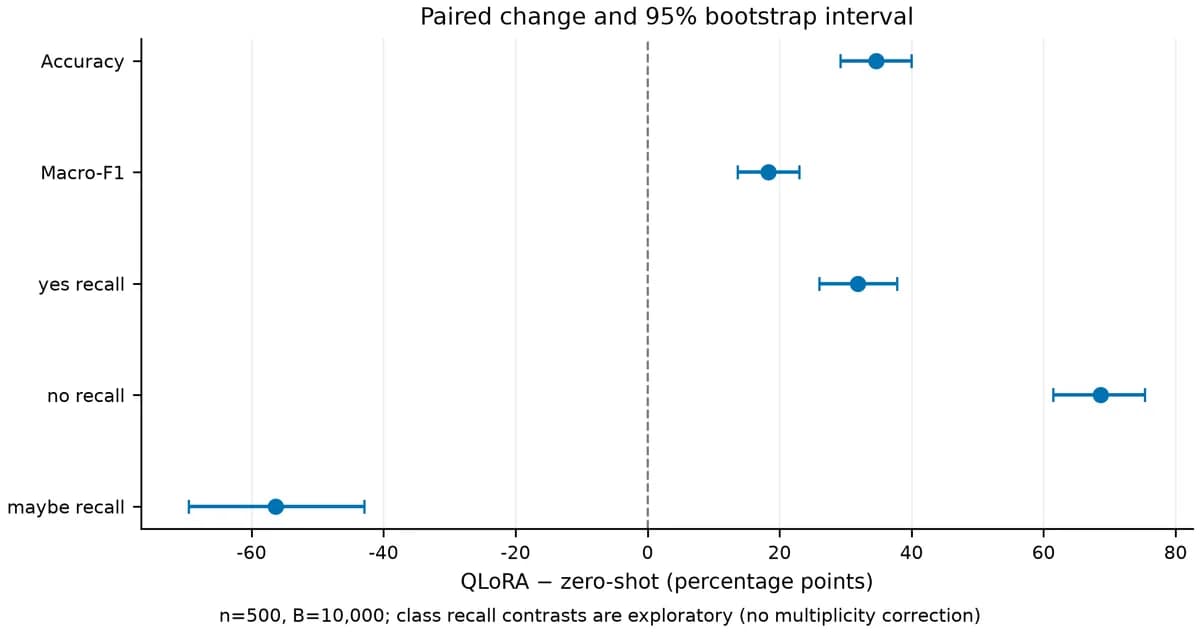
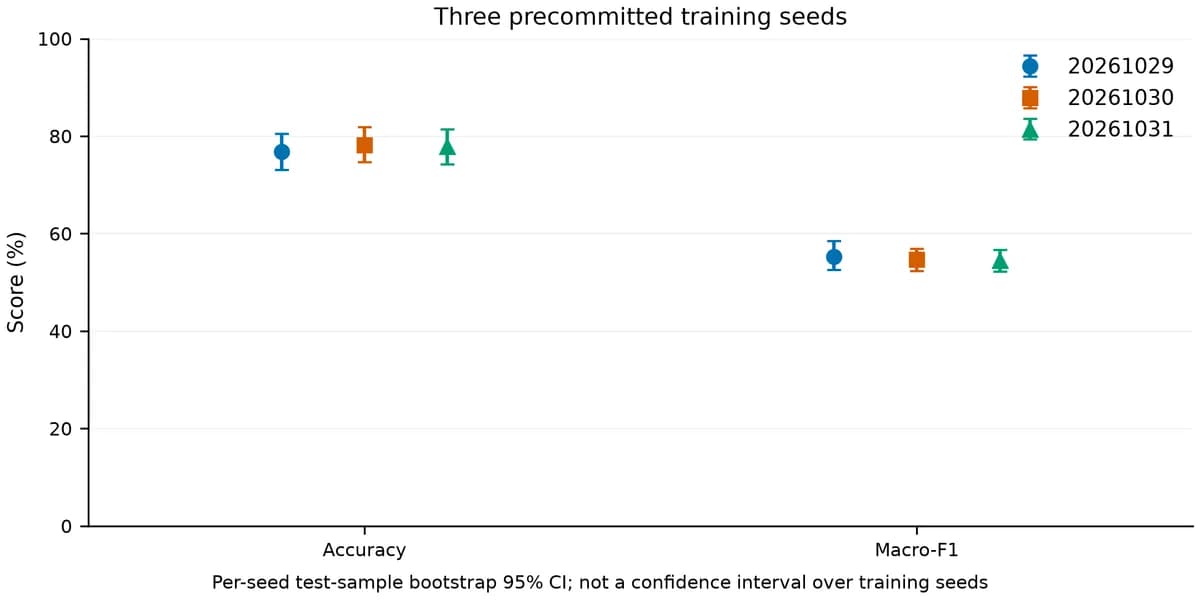
Paired bootstrap resamples the same test questions each time and computes the distribution of fine-tuned minus baseline. A 95% CI for the difference that excludes 0 means the gain is stable on these 500 questions. Overlap of the two models' separate intervals is not a substitute for a paired test, and 3 seeds × 500 questions are not 1,500 independent questions.
| Metric | Zero-shot baseline | QLoRA (main seed) | Gain (paired 95% CI) |
|---|---|---|---|
| Accuracy | 42.2% (38.0–46.6) | 76.8% (73.0–80.4) | +34.6 (+29.2 to +40.0) |
| Macro-F1 | 36.95% (33.0–40.8) | 55.28% (52.5–58.4) | +18.3 (+13.7 to +23.0) |
Step 8
Why this stepOverall accuracy can hide a class that gets worse.
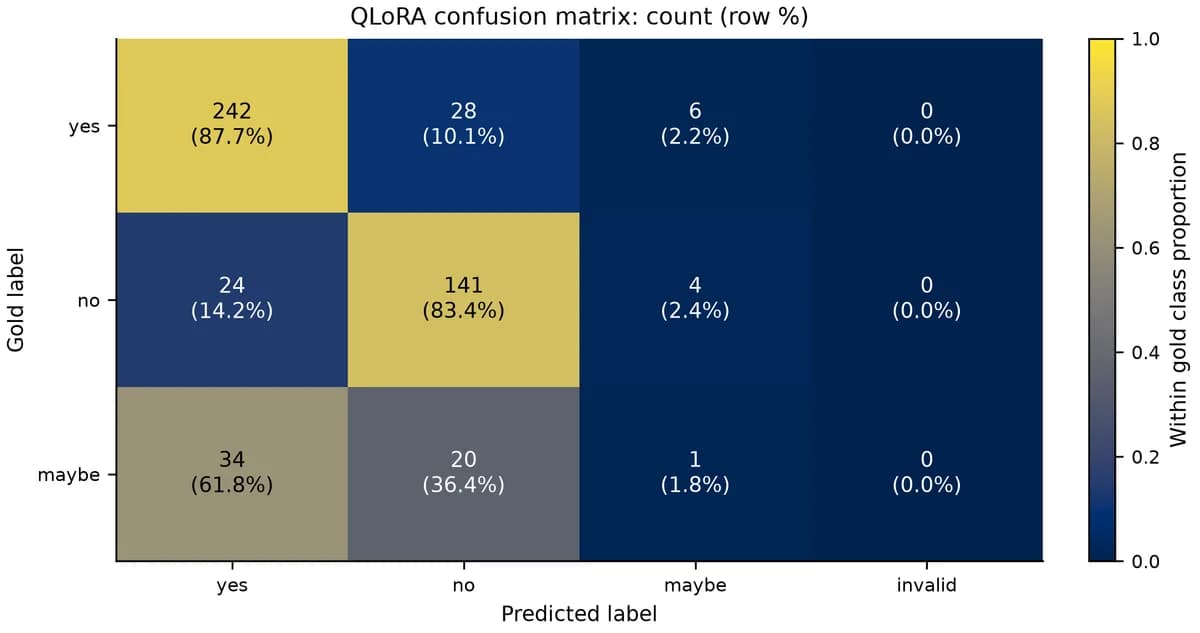
The gain comes from correcting yes and no: the base model over-answered maybe and fine-tuning fixed that. But the fine-tuned model almost never answers maybe, so its ability to say the evidence is insufficient has degraded. This may relate to how rare maybe is in the data (55 of 500 test questions).
If your application needs the model to say "uncertain" when evidence is lacking, this result is not usable as is. Options to try include class weighting or oversampling for maybe, or threshold tuning as a separate experiment, all validated on new held-out data. PubMedQA is an offline benchmark; accuracy does not establish clinical safety.
| Class | Questions | Baseline recall | Fine-tuned recall |
|---|---|---|---|
| yes | 276 | 55.8% | 87.7% |
| no | 169 | 14.8% | 83.4% |
| maybe | 55 | 58.2% | 1.8% |
Concepts and judgment
Comparison
Why this stepPublished scores show the range, but settings differ, so they are not a ranking.
Med-PaLM 2's 81.8% uses few-shot prompting and 11-sample voting, GPT-4's 75.2% is a single zero-shot answer, and this page fine-tunes on 450 expert questions with one greedy decode. The papers do not publish per-question predictions, so no paired test is possible; treat them as reference only.
| System and setting | Accuracy |
|---|---|
| Always answer yes | 55.2% |
| BioBERT, multi-phase, extra supervision (Jin et al. 2019) | 68.1% |
| GPT-4, zero-shot (Nori et al. 2023) | 75.2% |
| Single human annotator (Jin et al. 2019) | 78.0% |
| Med-PaLM 2, optimized prompt + 11-sample self-consistency (Singhal et al. 2023) | 81.8% |
| This page: Qwen2.5-7B + QLoRA, 450 expert questions | 76.8% (three seeds 76.8–78.2%) |
Reference and appendix
Run record
Why this stepData source and run conditions.
The numbers come from one long research task on Scientify on 29 October 2026. The user uploaded a task brief. Scientify estimated resources and rented an A10G GPU, checked the model revision and data split, ran the baseline before training, stopped when it found quantization inactive, kept the evidence and retrained every seed, then released the GPU after evaluation.
The deliverables were an 11-page report in Chinese, 8 figures, 3 Excel files, three adapters, 2,000 per-question predictions and reproduction code, and an independent review passed. The task took about 2 hours 40 minutes, about 1.9 hours of it on the GPU.

Common errors and fixes
In the order they occurred in this run.
Config says 4-bit, but VRAM looks like BF16
Cause: quantization_method was set to a value the framework does not recognize, such as bitsandbytes, and quantization was skipped silently.
Fix: Set quantization_method: bnb and assert at training start that is_loaded_in_4bit is True and Linear4bit layers exist.
ModuleNotFoundError: No module named 'torchaudio'
Cause: Recent LLaMA-Factory imports torchaudio unconditionally in its multimodal module, and the preinstalled PyTorch had no matching build.
Fix: For text-only tasks, make that import optional and record the patch; for audio, install a matching full environment.
CUDA out of memory
Cause: Quantization inactive, or batch or sequence length too large.
Fix: First confirm 4-bit is active; then lower per_device_train_batch_size or cutoff_len and keep the effective batch with gradient accumulation. Use the same protocol for baseline and fine-tuned runs.
transformers / peft version conflicts
Cause: Latest versions installed outside the range declared in LLaMA-Factory's pyproject.
Fix: Install within the declared ranges in a separate venv that reuses the existing PyTorch; do not replace the CUDA stack.
Model adds explanations and the evaluation marks them invalid
Cause: Generation is too long or the prompt differs.
Fix: Limit max_new_tokens and keep the prompt and parsing rule unchanged; keep raw outputs and never edit answers afterwards.
Please provide model_name_or_path
Cause: The low-level get_train_args was given a YAML path instead of a parsed dict.
Fix: Use llamafactory-cli train train.yaml, or yaml.safe_load the file first.