 Scientify
About this page
Tutorial- What this page solves
- You have a defect or object detection dataset. You want to train YOLOv8 or YOLO11 on it and judge whether the result is good enough to report.
- Who it is for
- Students using YOLO for a course project, thesis or first paper, and engineers working on industrial visual inspection. You should be comfortable with the command line and Python.
- What you will have
- A training workflow you can follow, plus complete test results for four models on NEU-DET to use as a baseline for your own experiments.
- Covers
- VOC XML to YOLO TXT conversion and directory layout
- Stratified splitting and handling duplicate images
- How to write data.yaml and use absolute paths on a server
- Training settings and real results for YOLOv8n/s and YOLO11n/s under one setup
- What mAP50 and mAP50-95 mean, and what is normal on NEU-DET
- How to read the confusion matrix, PR curve, per-class AP and error examples
- Does not cover
- Annotation tool interfaces (LabelImg, Roboflow)
- Architecture changes such as attention modules
- Deployment and TensorRT acceleration
Main path: step by step
Dataset
Why this stepThe split and the metrics depend on these counts.
NEU-DET is the detection subset of the NEU surface defect database released by Kechen Song's group at Northeastern University (China). It contains 1,800 grayscale images of hot-rolled steel strip, each 200×200 pixels, with 300 images for each of six defect classes. Annotations are VOC XML.
Our audit counted 4,189 boxes. Three of them are exact duplicate rows inside the same image, which Ultralytics removes on load, so 4,186 boxes are used. Image count, box count and class count are three different numbers and should be reported separately.
| Class ID | Name | Description | Test boxes |
|---|---|---|---|
| 0 | crazing | network of fine cracks | 107 |
| 1 | inclusion | embedded foreign material | 151 |
| 2 | patches | irregular surface patches | 120 |
| 3 | pitted_surface | small pits | 63 |
| 4 | rolled-in_scale | oxide scale pressed into the surface | 98 |
| 5 | scratches | linear scratches | 86 |
Step 1
Why this stepYOLO does not read XML. Each image needs a TXT file with the same name, one box per line.
A YOLO detection label has five columns: class_id x_center y_center width height. The last four are normalized to 0–1 by the image width and height. VOC bndbox stores pixel corners xmin, ymin, xmax, ymax, so they must be converted.
For example, a class 0 box (20, 40, 100, 120) in a 200×200 image becomes the line 0 0.30 0.40 0.40 0.40. An image with two defects has two lines.
neu_det_yolo/
├── data.yaml
└── data/
    ├── images/{train,val,test}/crazing_103.jpg
└── labels/{train,val,test}/crazing_103.txtx_center = (xmin + xmax) / (2W)
y_center = (ymin + ymax) / (2H)
width = (xmax - xmin) / W
height = (ymax - ymin) / HStep 2
Why this stepTrain updates the weights, val selects the checkpoint and drives early stopping, and test is used only for the final report.
We stratified by image class with a fixed seed and split 70%/15%/15% into 1,260/270/270 images, or 210/45/45 per class. All four models used the same split list.
Compute a SHA256 hash for every image before splitting. Here patches_101.jpg and patches_105.jpg are byte-identical, so both were placed in the same split. If they land in train and test, the test score is inflated.
Do not use the test set to choose epochs, learning rate or augmentation. Changing the model after looking at test errors requires new held-out data.
| Ratio | Advantage | Cost |
|---|---|---|
| 70/15/15 (this run) | 45 val and 45 test images per class | Less training data than 80/10/10 |
| 80/10/10 | More training data | Only 30 test images per class, so results vary more |
| Group by batch for industrial data | Tests transfer to a new line or camera | Requires capture metadata |
Step 3
Why this stepdata.yaml tells YOLO where each split's images are and what the classes are called.
train, val and test point to image folders. YOLO finds labels by replacing images with labels in the path. Ultralytics versions resolve a relative path differently, so regenerate data.yaml with an absolute path on the GPU server before training.
path: /absolute/path/to/neu_det_yolo/data
train: images/train
val: images/val
test: images/test
names:
  0: crazing
  1: inclusion
  2: patches
  3: pitted_surface
  4: rolled-in_scale
5: scratchesStep 4
Why this stepAll four models use identical settings so their results can be compared.
nvidia-smi
python -c "import torch, ultralytics; print(torch.__version__, torch.cuda.is_available(), ultralytics.__version__)"yolo detect train data=data.yaml model=yolov8n.pt \
epochs=200 patience=50 batch=16 imgsz=640 \
optimizer=SGD lr0=0.01 seed=20261027 deterministic=True \
workers=4 device=0| Parameter | Value | Note |
|---|---|---|
| epochs | 200 | Upper limit; early stopping can end sooner |
| patience | 50 | Stop after 50 epochs without validation improvement |
| batch | 16 | Fits in a 16 GB T4 |
| imgsz | 640 | 200×200 images are upscaled, which adds no detail |
| optimizer | SGD | Set explicitly; optimizer=auto ignores lr0 |
| model | yolov8n/s.pt, yolo11n/s.pt | All start from official COCO pretrained weights |
Step 5
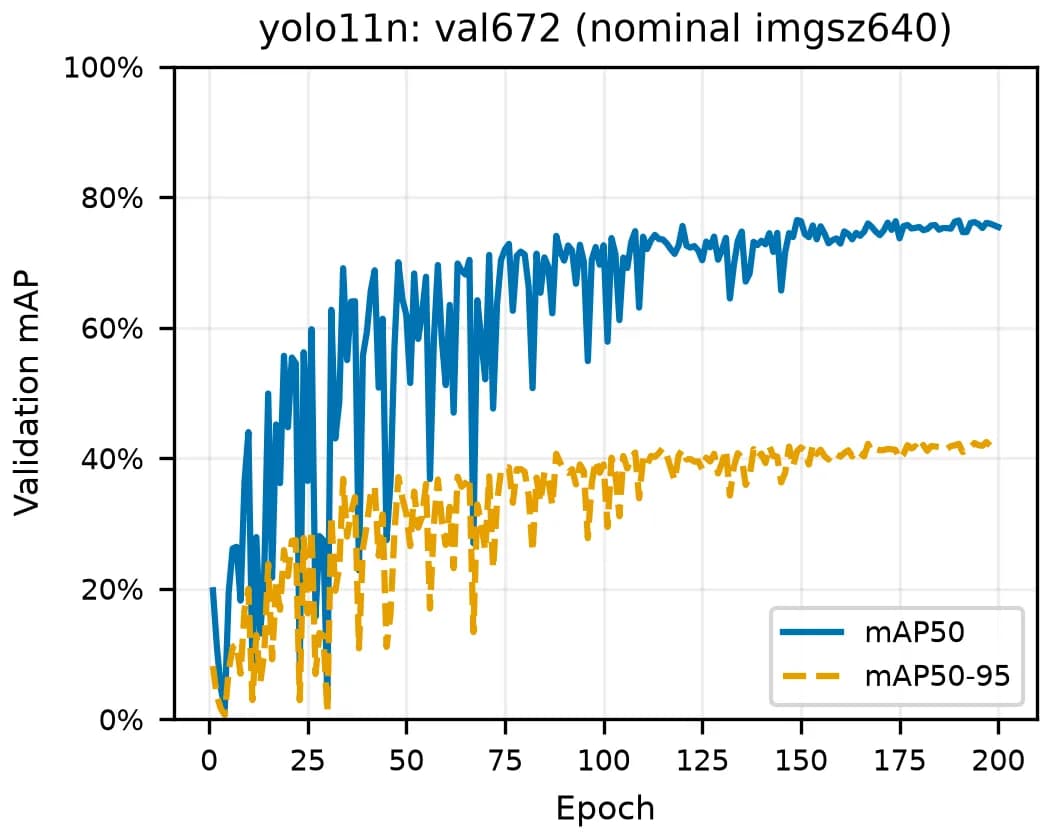
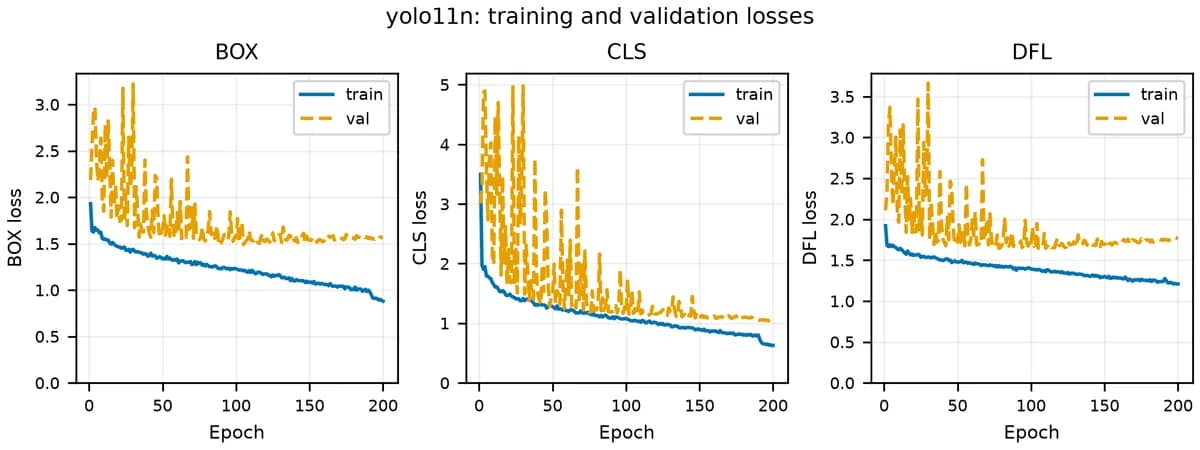
Why this stepCurves show convergence and overfitting. They are not the final score.
box_loss
Position error between predicted and true boxes. Lower is better, but values are not comparable across models.
cls_loss
Classification error. Falling training loss with steadily rising validation loss and falling validation mAP signals overfitting.
Large early swings
The NEU-DET validation set has only 270 images, so per-epoch mAP is noisy. Read the trend and the mean of the last 20 epochs, not a single peak.
Curve ends before epoch 200
This may be early stopping or an interruption. Check the log; do not fill in missing epochs.
Step 6
Why this stepTo answer whether your mAP is normal, compare against a baseline with the same dataset and evaluation method.
IoU is the intersection area of the predicted and true boxes divided by their union. mAP50 averages per-class AP at an IoU threshold of 0.5, so a box only needs to roughly overlap. mAP50-95 averages AP over ten thresholds from 0.50 to 0.95 in steps of 0.05, so boxes must fit tightly, and it is always lower than mAP50.
A common claim is that mAP50-95 above 0.7 is good. That claim ignores the dataset. NEU-DET defects have vague boundaries: all four models score 41%–43% mAP50-95, and five papers report YOLOv8n mAP50 between 74.8% and 78.4%. On this dataset, about 75% mAP50 and 42% mAP50-95 is a normal baseline.
| Model | Test mAP50 | Test mAP50-95 | Precision | Recall |
|---|---|---|---|---|
| YOLOv8n | 77.06% | 42.14% | 74.7% | 71.6% |
| YOLO11n | 76.60% | 42.82% | 75.2% | 69.3% |
| YOLO11s | 75.76% | 42.62% | 74.2% | 71.2% |
| YOLOv8s | 74.63% | 41.12% | 72.5% | 69.0% |
Step 7
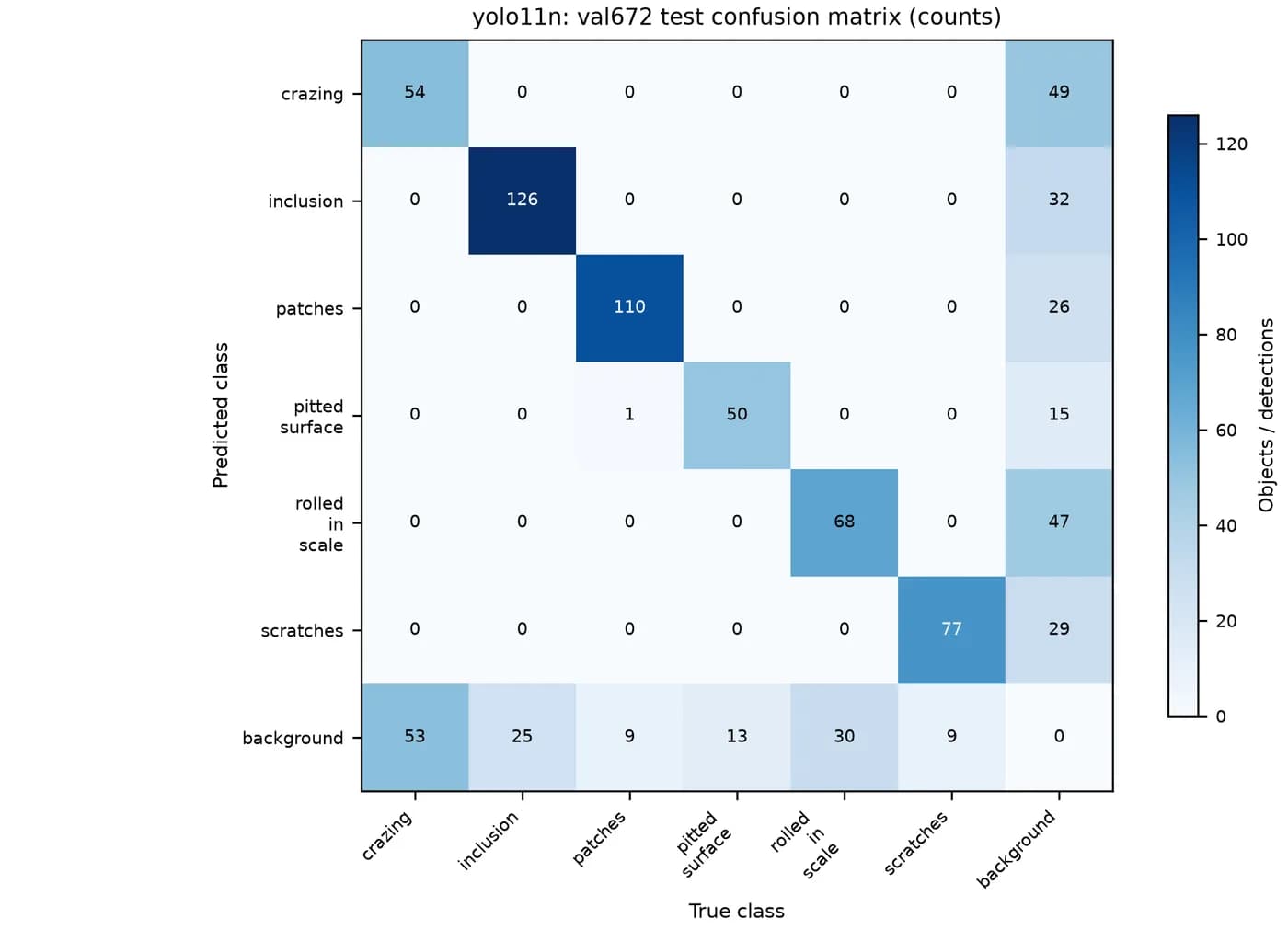
Why this stepThe confusion matrix separates class mix-ups from missed and false detections.
Read the axes first. Here the horizontal axis is the true class and the vertical axis is the predicted class. The diagonal counts correct boxes.
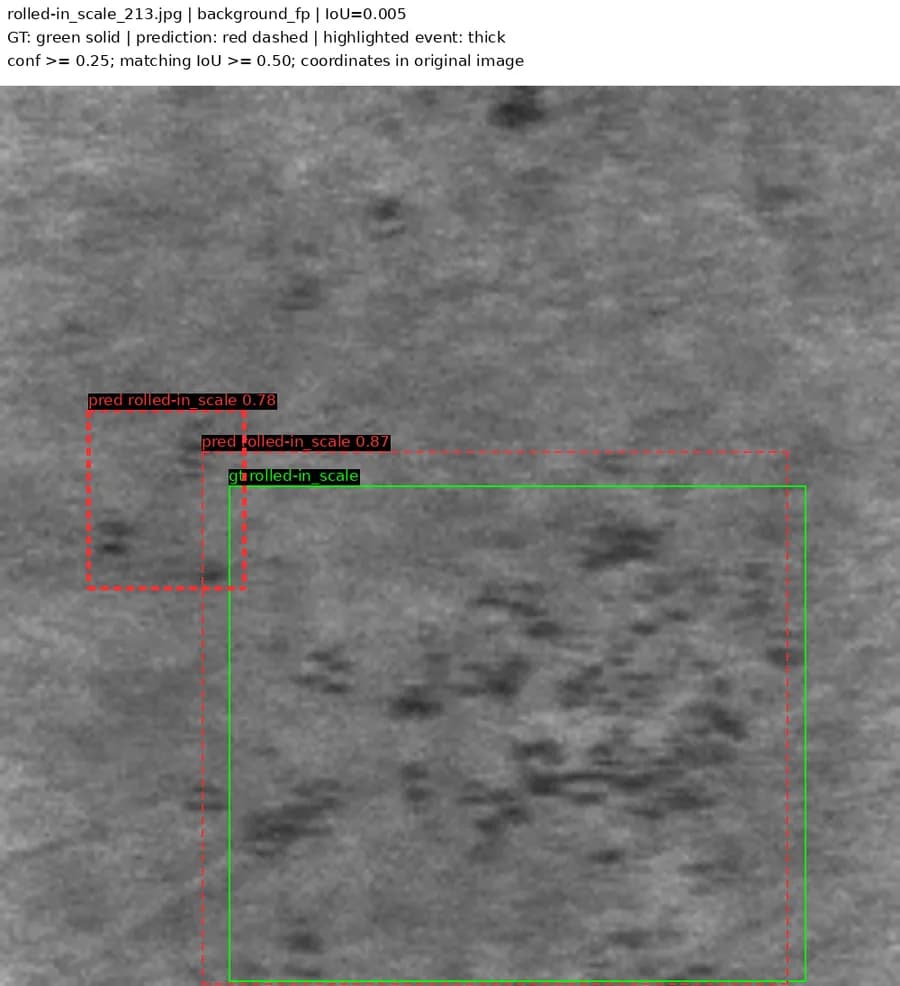
The bottom background row counts misses: real boxes the model did not report. The crazing column has 53 misses against 54 correct, so half of the 107 crazing boxes were missed. The rightmost background column counts false positives: predicted boxes with no matching defect. The crazing row has 49 and the rolled-in_scale row has 47.
The six defect classes are almost never confused with each other; only one patches box was predicted as pitted_surface. On NEU-DET the main problem is separating defects from background.
Step 8
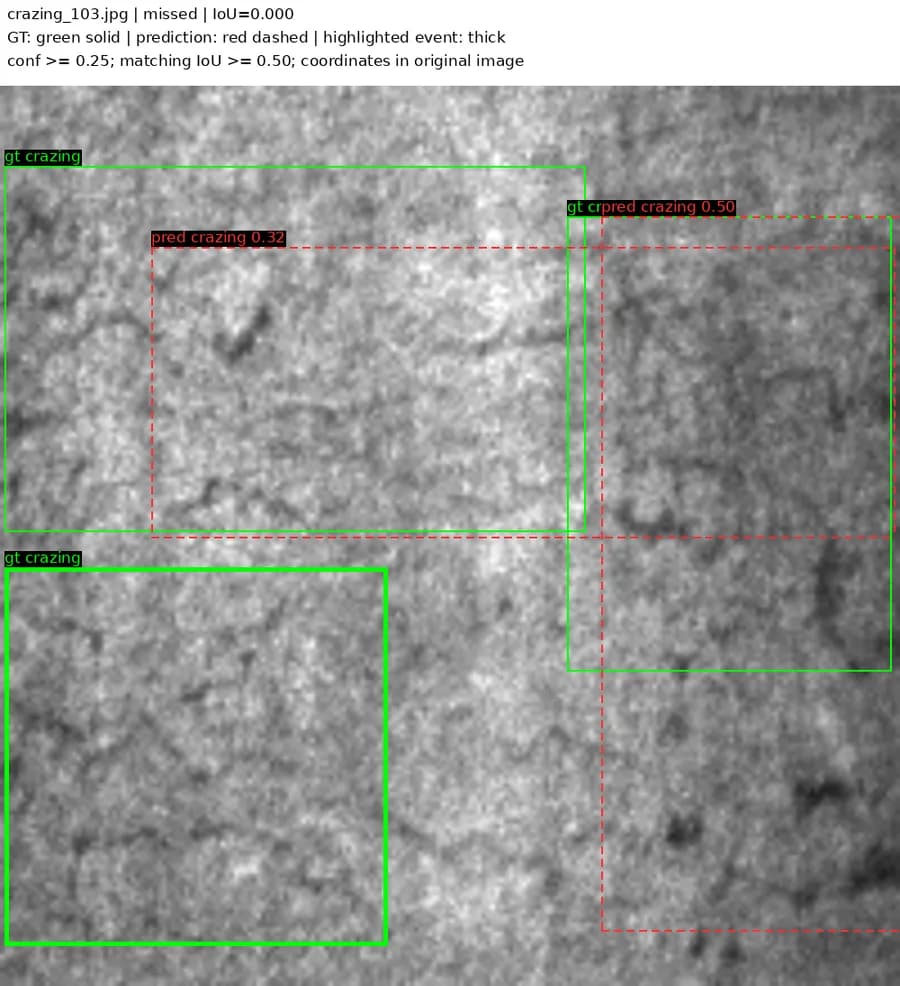
Why this stepOverall mAP hides the weakest classes. Per-class AP shows where to work next.
Crazing is a fine network texture spread over the whole region, so box boundaries are hard to annotate consistently. Rolled-in scale looks similar to normal oxide texture. Their AP50-95 values are only 14.6% and 28.6%. To raise overall mAP, start with these two classes: check annotation consistency and study missed examples before changing the architecture.
| Class | YOLO11n AP50 | YOLO11n AP50-95 | YOLOv8n AP50 in three papers |
|---|---|---|---|
| crazing | 43.7% | 14.6% | 38.8%–47.9% |
| inclusion | 85.1% | 41.1% | 82.0%–84.9% |
| patches | 93.9% | 64.4% | 88.9%–94.0% |
| pitted_surface | 85.3% | 57.7% | 83.3%–84.3% |
| rolled-in_scale | 62.7% | 28.6% | 55.9%–66.9% |
| scratches | 89.0% | 50.5% | 92.0%–97.1% |
Concepts and judgment
Background
Why this stepThis explains a common reason your numbers do not match a paper or a colleague's.
Training used imgsz=640, but Ultralytics val uses rectangular inference by default (rect=True), and the 200×200 images were actually processed as 672×672 tensors. Saving predictions with predict at 640×640 and computing AP from them gives different numbers.
Under the 640 method, mAP50 is 74.29% for YOLO11n, 74.03% for YOLO11s, 70.52% for YOLOv8n and 69.53% for YOLOv8s. YOLOv8n ranks first under val defaults and YOLO11n ranks first under the 640 method. The weights are the same; only the evaluation changed.
An independent review found this mismatch, and the report lists both sets of results separately. When comparing with papers, align at least the split, input size, epochs, pretrained weights, software version, and whether results are on val or test.
| Paper | Split | YOLOv8n mAP50 |
|---|---|---|
| FP-YOLOv8 (Sensors 2024) | train/val 7:3 | 74.8% |
| DDI-YOLO (Applied Sciences 2024) | 1440/180/180 | 75.9% |
| YOLO-SDS (Sensors 2024) | 9:1, 1620/180 | 76.2% |
| DSL-YOLO (Sensors 2024) | 8:1:1, 1440/180/180 | 76.4% |
| Regularized YOLO (Sensors 2024) | train/val 8:2 | 78.4% |
| This page (val defaults) | 1260/270/270, test set | 77.1% |
Choose by your situation
Choosing
Why this stepChoose a model by accuracy, speed and size.
On a small dataset like NEU-DET with 1,800 images, the s models were not more accurate than the n models, and they were 2–3 times slower on CPU. Start with an n model as the baseline when data is limited. YOLO11n has fewer parameters and slightly higher mAP50-95. Try s or larger when you have more data or smaller objects.
| Model | Params | GFLOPs | Weights | T4 per image | CPU per image |
|---|---|---|---|---|---|
| YOLO11n | 2.61M | 6.6 | 5.5 MB | 9.7 ms | 166 ms |
| YOLOv8n | 3.14M | 8.8 | 6.5 MB | 8.0 ms | 166 ms |
| YOLO11s | 9.43M | 21.7 | 19.2 MB | 10.8 ms | 382 ms |
| YOLOv8s | 11.14M | 28.7 | 22.5 MB | 11.0 ms | 480 ms |
Reference and appendix
Run record
Why this stepData source and run conditions, so you can check the numbers.
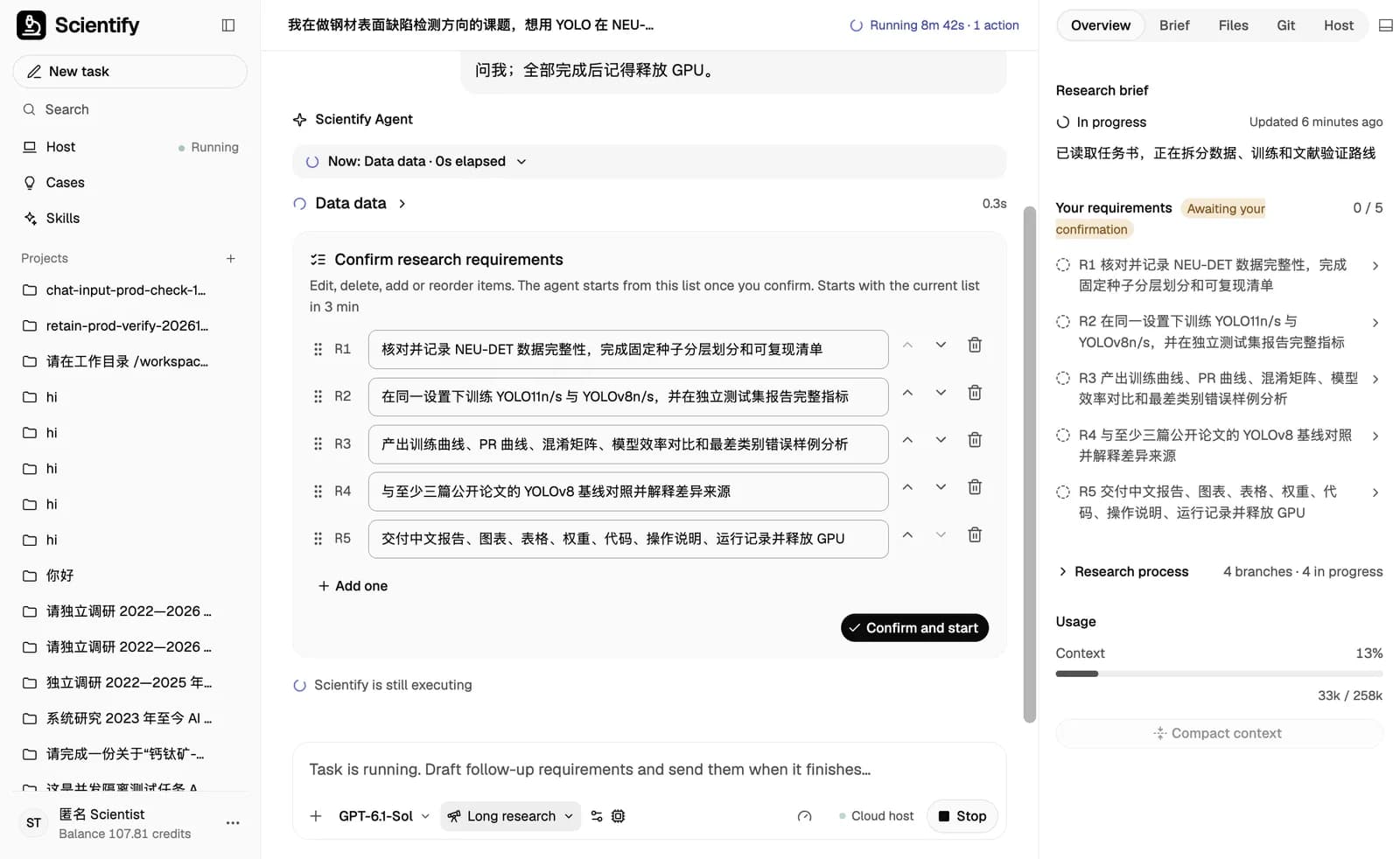
All numbers on this page come from one long research task on Scientify on 27 October 2026. After the user uploaded a task brief, Scientify listed five research requirements for confirmation. It then downloaded the data, checked for duplicate images, rented one T4 GPU, trained the four models in sequence, synced the results back to the workspace, released the GPU, and wrote a 35-page report in Chinese.
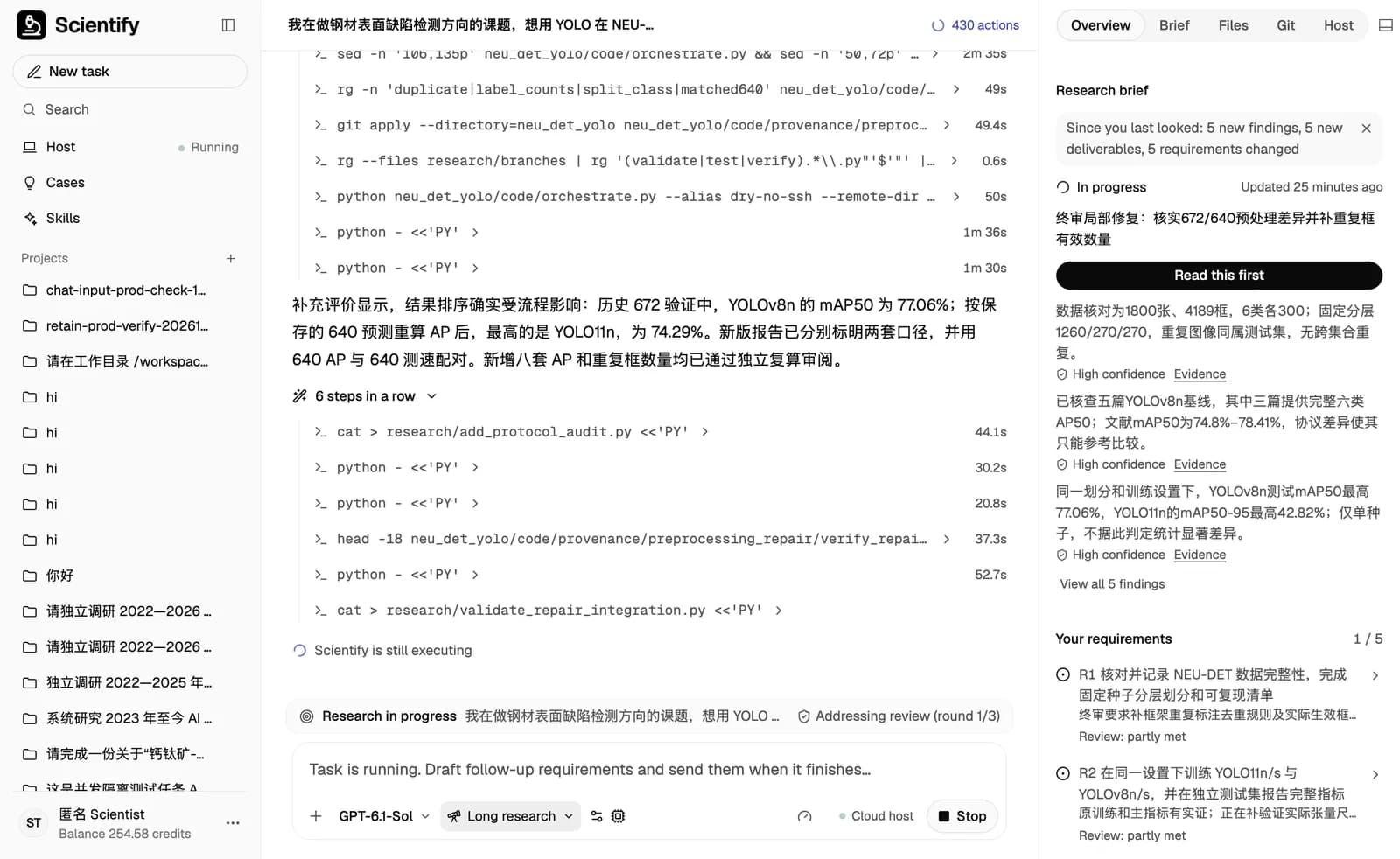
After the first report, an independent review flagged that validation and speed tests used different input sizes (672 and 640). Scientify recomputed everything under the 640 method and changed the conclusion from "YOLOv8n is best" to "the ranking depends on the evaluation method". The second review passed. The task took about 5 hours, about 3 of them on the GPU.
Common errors and fixes
Ordered by how often they occur.
Dataset images not found / FileNotFoundError
Cause: The path in data.yaml is relative or points to your local machine, or case and extensions differ.
Fix: Regenerate data.yaml with an absolute path on the training machine and confirm that images/train and the other folders exist.
No labels found, or an unusually high background count
Cause: labels does not mirror images, or XML files were passed to YOLO directly.
Fix: Make sure every image has a non-empty TXT with the same name under labels. Convert VOC to YOLO first.
non-normalized or out of bounds coordinates
Cause: Pixel coordinates were written to TXT, or COCO xywh was treated as VOC xyxy.
Fix: Normalize by the original image size. Find the bad source annotations instead of clipping every box.
Label class exceeds dataset class count
Cause: Class IDs do not start at 0, or names order differs from the conversion.
Fix: Keep one class map and use it for both conversion and data.yaml.
Labels were fixed but counts are unchanged
Cause: YOLO cached the previous scan.
Fix: Delete the .cache file next to labels and train again.
CUDA out of memory
Cause: Batch is too large or another process holds GPU memory.
Fix: Check usage with nvidia-smi. If memory is still short, lower batch for every model in the comparison.
torch.cuda.is_available() returns False
Cause: A CPU-only PyTorch is installed, or a different Python is running.
Fix: Check with which python and pip show torch, then install a GPU build that matches the driver.
Loss is nan or mAP stays at 0
Cause: Wrong label coordinates or classes, pretrained weights not loaded, or learning rate too high.
Fix: Overlay labels on sample images, confirm model=*.pt, then check learning rate and AMP. More epochs will not fix this.
References
- Ultralytics train mode and arguments
- Ultralytics val mode and metrics
- Ultralytics detection dataset format
- NEU-DET, IEEE DataPort — Dataset description and download
- FP-YOLOv8, Sensors 2024 — YOLOv8n baseline mAP50 74.8%
- YOLO-SDS, Sensors 2024 — YOLOv8n baseline 76.2%, with per-class AP50
- DSL-YOLO, Sensors 2024 — YOLOv8n baseline 76.4%
- DDI-YOLO, Applied Sciences 2024 — YOLOv8n baseline 75.9%, with per-class AP50
- Regularized YOLO, Sensors 2024 — YOLOv8n baseline 78.41%, with per-class AP50